New post
Avatar
0

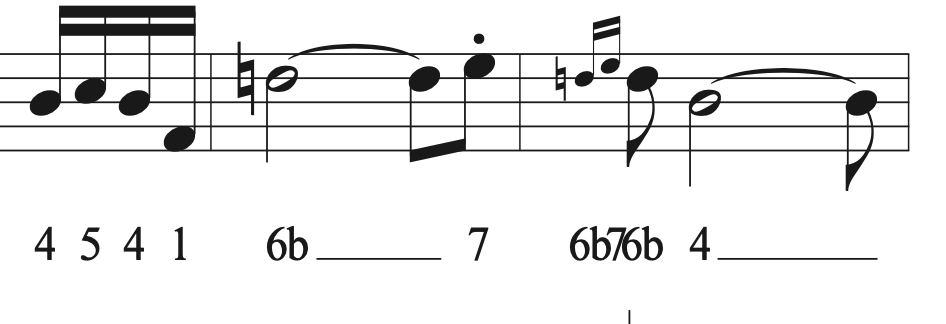
I write music for a specialized instrument using a "number tab" system, with numbers shown under the corresponding notes using the Lyrics tool; it's essentially a number that corresponds to scale degree.  Finale' (I use v.26.3.1.643 on an iMac, OS Catalina 10.15.7) software works great for this system for my compositions with one troubling exception:  The problem comes when I put more than one digit under a grace note (for example, a succession of two or three grace notes that would be noted as "7 6b 8")  No matter what I've done with the Music Spacing, the software crowds the digits tied to grace notes (only) in such a way that the reader would be confused.  I'm looking for a way to get those notations spaced out so they don't collide.  

5 comments

Date Votes
Avatar
0

Can you post a small, sample image of what you have now?

Comment actions Permalink
Avatar
0

It sounds like you need to do some manual tweaking of the spacing. Have you tried using the "note Position" tool in the special tools palette? Just nudge the note enough so that the text doesn't collide. You'll also have to turn off automatic music spacing in your Finale preferences. If you leave them on Finale will undo your manual tweaks.

Comment actions Permalink
Avatar
0

Jeff is right about the need to manually respace. You might also try making adjustments to the beat spacing chart, to give you more room around the grace notes.

Comment actions Permalink
Avatar
0

Jeffrey & Mike,

Thank you for your advice; once I figured out how to use the right tools and settings, I was able to overcome the problem.  

To Adrian:  here's what it can look like, without the suggested adjustments.  Thank you all for your interest and help!


Comment actions Permalink
Avatar
0

Thank you. Glad you were able to find a solution to your situation.

Comment actions Permalink

Please sign in to leave a comment.