New post
Avatar
0

Hello, Finale Community,

On a one-line staff for Triangle(s), noteheads appear in the center of the singular line.

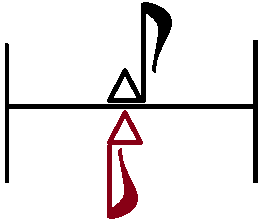
I was wondering if the following is possible: to have noteheads meant for Large Triangle to appear tangentially below the staff's line; and tangentially above for Small Triangle.
Thanks greatly! Always.


Regards,

5 comments

Date Votes
Avatar
0

Indeed it is possible.


Create a custom staff:

ScoreManager > Instrument List

In the Instrument List, select the staff you will customize as a Triangles staff.

In the pop up menu Staff, choose {Other…}.

You get to the dialog box Staff Setup.


Click the option Custom Staff, to get all staff options.

Handles appear on the staff-lines.

De-select the handles for the staff-lines you do not need to display (you may have to click precisely on the handle).

My guess is that you prefer to display only the middle staff-line.


Set a vertical positioning of the Barline Top (e. g. 6pt) and Barline Bottom (e. g. -6pt).

Customize the Default Placement of the various items (= rests &c.).


With this custom staff you can enter notes on all scale steps.

Comment actions Permalink
Avatar
0

What will I do without you Peter Thomsen; as well as the rest of our Finale Staff.


~~~~~~~~~~~~~~~~


I'm assuming that either I didn't explain something I should have or I misunderstood.


It didn't work (yet): the noteheads are still restricted to the center of the middle 1-line; no matter how far up or down I drag the note from that line.


In Staff Setup Dialog box, the only items available for customization are rests, dots and stem reversal. I don't see any for noteheads.


Does it matter that I have the sound of the instrument item set to "Orchestral Percussion", the sound system device set to "NotePerformer", or the notational style set to "1-line triangle"?


Comment actions Permalink
Avatar
0

… Does it matter that I have the sound of the instrument item set to "Orchestral Percussion", the sound system device set to "NotePerformer", or the notational style set to "1-line triangle"? …


Perhaps you mean that the Percussion Layout is set to {1-line Triangle} ? (not the Notation Style, but the Percussion Layout)


In the dialog box Percussion Layout Selection the layout {1-line Triangle} is selected - right?

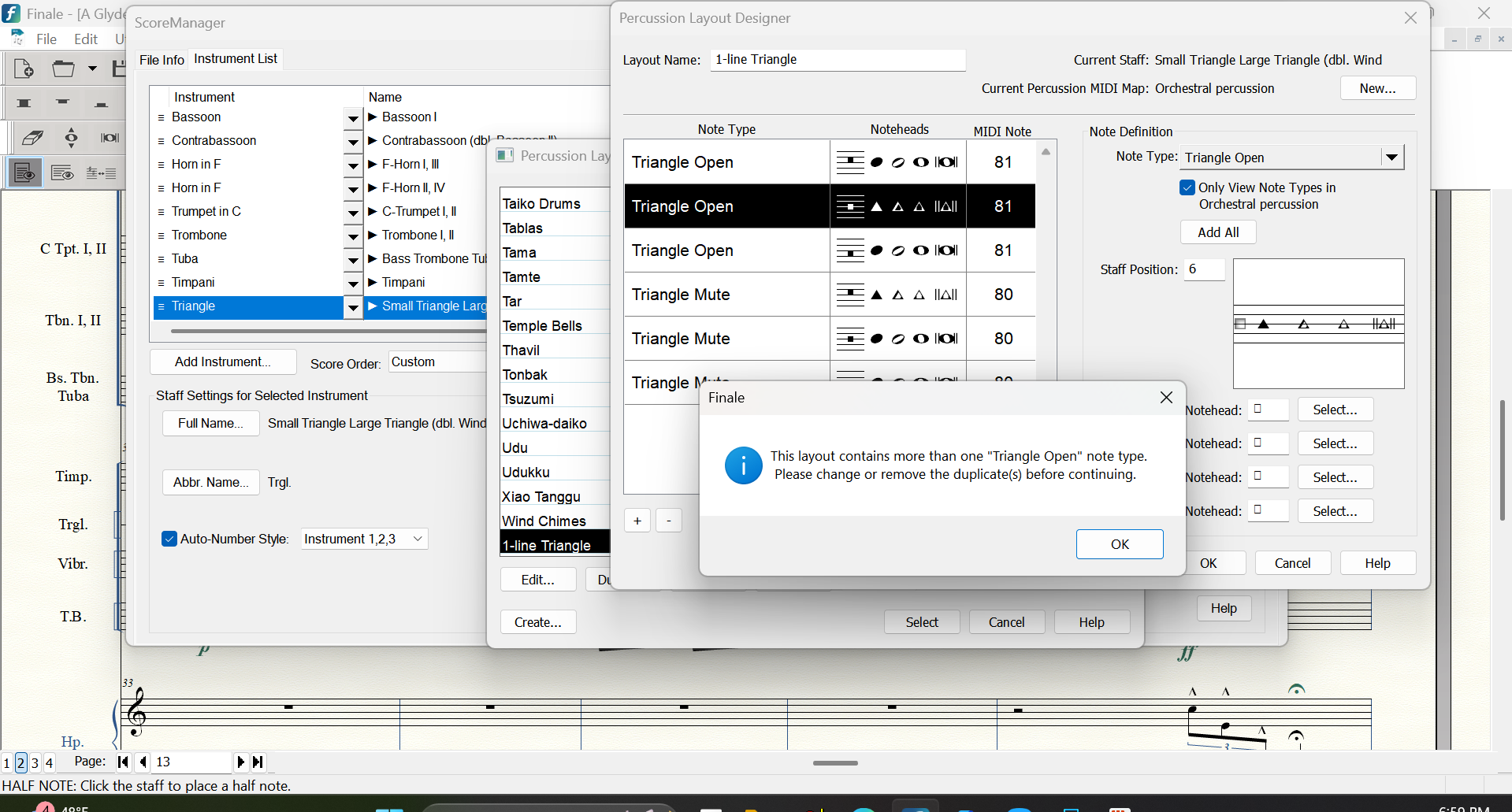
While {1-line Triangle} is selected, click the button Edit… to edit the Percussion Layout (or click Duplicate first, to create a new, custom layout).

Staff Position 7 is one scale step above the middle line.

Staff Position 6 is on the middle line.

Staff Position 5 is one scale step below the middle line.

Comment actions Permalink
Avatar
0

Yes, indeed that was my mistake: Percussion Layout was what I meant.


And, I'm glad we are going far with this!


I'm almost at the finish line. I just have one more problem on the way.


Apparently, I'm not allowed to use Triangle Mute and Triangle Open more than once each. (I probably figured this wrong, but I thought this arrangement containing 3 Mutes and 3 Opens, with one of each on Stff. Pos. 5, 6 and 7, would allow playback to sound on all three staff position configurations.)


Comment actions Permalink
Avatar
0

Nevermind, I figured it soon after my most previous inquiry.


It appears that Triangle Open(2) and Triangle Mute(2) note-types were dispersed after Triangle Open and Mute note-types were used. I didn't see that the first time.


Thanks again greatly for your help!


Comment actions Permalink

Please sign in to leave a comment.