New post
Avatar
0

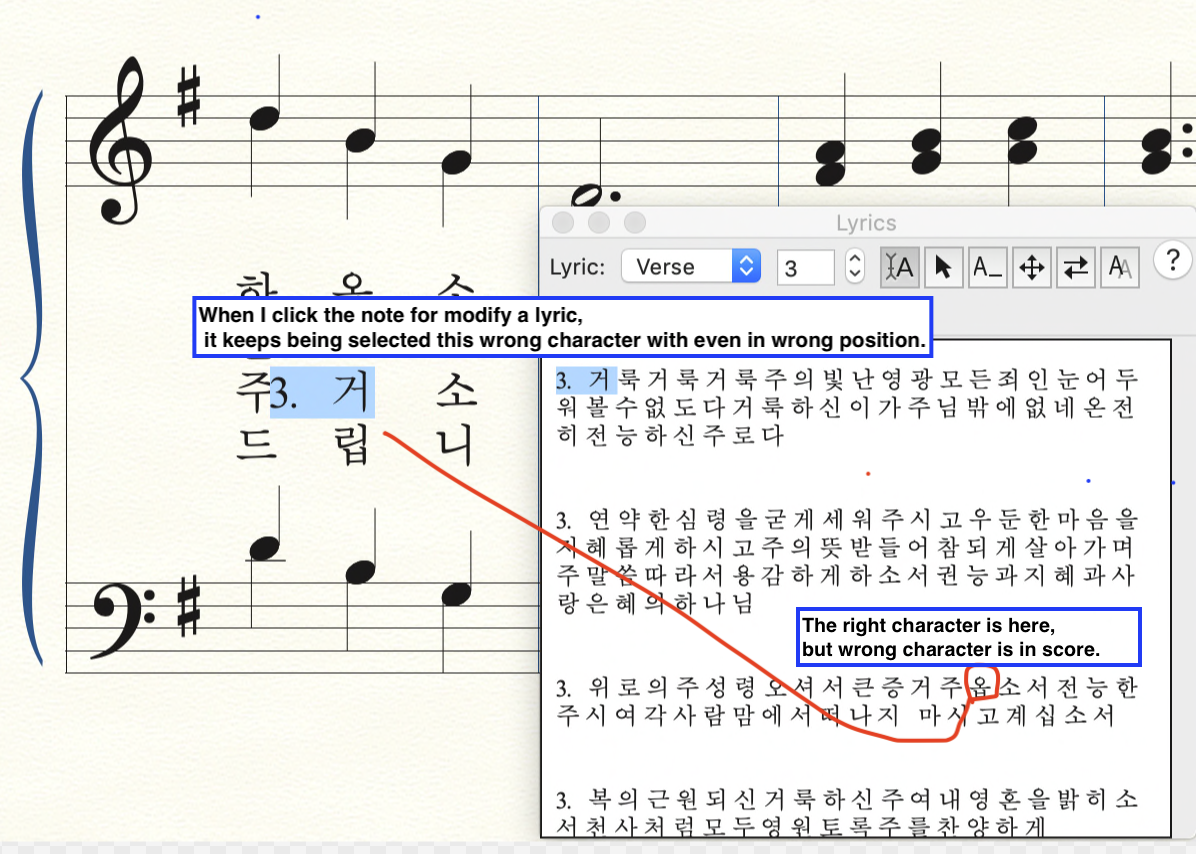
I input right. But when I've looked back, it had became. 

More problem is, it wont't be modified. It I re-input 옵 the right thing in the selected position in the picture, 3. 거 which is in other position and selected in the picture is also be changed by 옵. 

How can I do? 

Thank you.

3 comments

Date Votes
Avatar
0

Kim, can you send me the finale file, please?

Comment actions Permalink
Avatar
0

If one copies music with lyrics, one often finds the lyrics have been copied as well. Be sure the stanza you see in your Lyric Window is the version actually assigned to the chosen musical notes.


If I Recall Correctly, double-clicking the lyric will highlight the appropriate syllable in the Lyric window.

Comment actions Permalink
Avatar
0

Adrian, that doesn't seem to be the case, here. Somehow, a lyric from an earlier section is slipping in to this verse.


Part of the problem is that he is trying to put many hymns (250!) into a single Finale file. I'm suggesting that he break them into more easily handled chunks, because whenever we do anything with shifting or replacing a lyric, it affects something 3 songs ago.


It would be nice if shifting lyrics and option-click-assign could be controlled with page breaks or some other division, but so far, I haven't found any. Maybe in that next rewrite of the Lyrics tool? <tongue firmly in cheek>

Comment actions Permalink

Please sign in to leave a comment.