I am using a Midisport Uno MIDI interface cable with a Yamaha PF-500. Cannot get Hyperscribe to work. Have checked with all product's support info, have made sure I have the Uno driver installed for Windows 10. Nada.


Can you input notes in step time via Speedy Entry and your MIDI keyboard. If you can communicate with Finale via the MIDI keyboard in any fashion, then the challenge is to find out why your approach to Hyperscribe is producing atypical results.
Can you communicate with any other computer program/function via your MIDI keyboard. If so, the cable is not at fault.
When you say "play back," do you mean the sound is coming out of the PF-500?
To use Hyperscribe you need to run info from the PF-500 into Finale? Can you do that in any mode (Simple Entry, Speedy Entry or Hyperscribe)?
(You know that the MIDI IN on the cable plugs into the MIDI OUT of the PF-500 and vice versa, right? Lots of folks get that backwards.)
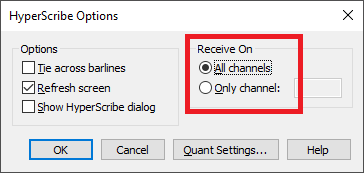
Have you set the options to receive on all channels in Hyperscribe Options?
Yes, I understand about the MIDI IN and OUT (I'm a composer and have been using this kind of cable with Finale and a Yamaha keyboard for about 10-15 years. I don't normally play my music back through the keyboard, but I wanted to check to see if Finale and the keyboard were speaking. They are (and the sound is dreadful!) The hitch is that I was given the PF-500 (I had been using a P-120 for years) and that is when the hyperscribe issue showed up. I thought it was a driver issue, so I checked with Yamaha, but they are no help since the agent I spoke with says they don't update drivers (I find that hard to believe.)
I cannot get Speedy Entry to register notes when I attempt to enter them by holding a pitch on the keyboard and use the number pad on the computer keyboard - all I get are rests which indicates that the signal from the Yamaha keyboard isn't getting through.
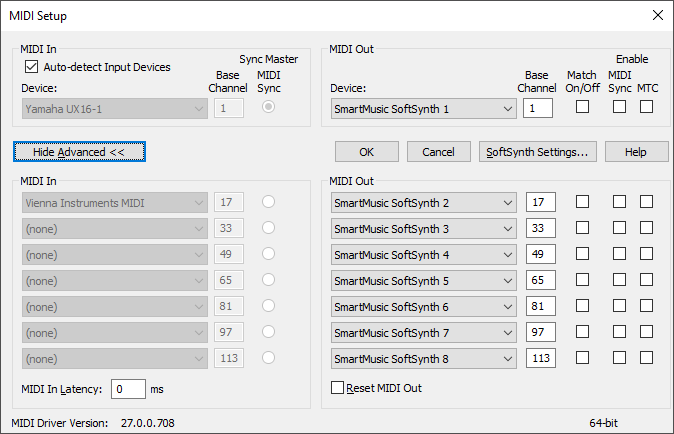
This info is helpful in that the problem is not with Hyperscribe but with all MIDI In from your PF-500. Before seeing if a friend can lend you a cable to check whether the In part of your cable is faulty (unlikely), you might want to check this screen, which should have set itself up automatically.
Have you checked the PF-500 Manual to see if your MIDI Out settings are okay in case that is the problem?
https://usa.yamaha.com/files/download/other_assets/3/328783/PF500E1.pdf
Yes, this is how my Advanced MIDI setup looks except the MIDI IN device is "MIDISPORT Uno In" which is how it was listed when I used the Yamaha P-120. The cable is a new purchase so I doubt it is faulty. *Sigh* Thanks for your help. I have an appointment with computer people tomorrow and perhaps all will be revealed at that time.
By the way, I did find a Yamaha HiFiUSB driver which I downloaded, but that didn't seem to make any difference either.
Please sign in to leave a comment.
13 comments
Date Votes