New post
Avatar
0

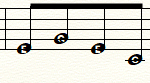
When using alphanotes: The staff lines show behind the letter in the notehead, making it difficult to read the letter  (ie. treble clef E G B D A).  How do I remove this?  I know it can be done, someone in a forum posted it, but it's an old post and they didn't say HOW to do it...

I am using Finale 2014 on Windows.

Here is what I see when I use alpha notes...hard to read.  
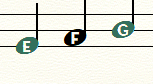
Someone figured out how to remove the lines behind the E and G...much easier to read.  How did they do it?
3 comments

Date Votes
Avatar
1

Welcome to the forum!


It can be done, but this is definitely not for “Finale beginners”.

You need to use the Shape Designer which is a drawing environment inside Finale:


Use shape articulations placed on the “Line Noteheads”.

Each shape articulation is made of two elements (using the Shape Designer):


1) The notehead character (this means that you need to create an articulation for each scale step, 7 articulations for each of the 3 notehead types = 21 articulations).


2) A rectangle covering the staff-line inside the notehead.

Give this rectangle a line thickness of zero, fill the rectangle with White, and send it to the Back - so that the notehead character is fully visible (in front of the white rectangle).

The rectangle will cover the staff-line behind the notehead articulation.


You can Group the shape when you are done.


To get the shape articulation positioned precisely, define the articulation so that it by default positions itself exactly in front of the “real” notehead.


Entering all the articulations may take some time - since you need to put a “notehead articulation” on each and every “Line Notehead”.

To speed up the work I strongly suggest using articulation metatools.


I hope that this is clear?

If not, ask again.

Comment actions Permalink
Avatar
0

Peter, would it be possible for you to make a more elaborate tutorial. I am trying to follow your instructions but I am having a hard time figuring out the steps you mention. A video tutorial would be phenomenal, but also a step to step guide would help tremendously! Thanks!

Comment actions Permalink
Avatar
0

Welcome to the forum!


Are you an experienced Finale user?

I am not sure how detailed instructions you need.


There is no need to tell you what you already know.

Please tell how far you have come in my instructions.

- Have you been in the Articulation Designer? - in the Shape Designer?

- Have you created a shape articulation?


You can also send me an e-mail - {gtpthomsen ad aim dot com}, and I can send you a Finale document with the articulations.

Comment actions Permalink

Please sign in to leave a comment.