Is there any chance that the roll articulation could automatically 1) be placed to the left of the chord and 2) adjust to the chord's height
I usually get this, which is weirdly placed and taller than the chord.
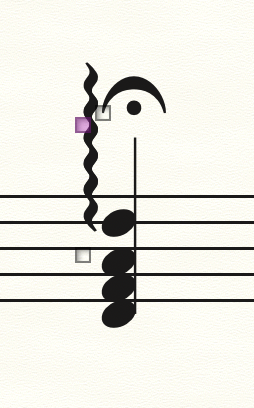
Thanks,


You are using Mac Finale - right?
As Far As I Know, the roll articulation’s length is a default length, and the articulation can not “see” the chord’s height.
The horizontal positioning is set in the Articulation Definition.
From the Articulation Selection, select the roll articulation, and click the button {Edit…}.
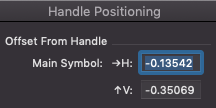
You get to the Articulation Designer. Click the button {Handle Positioning} - to see the default position.
NB: To make the articulation position itself at its default positioning, either
- Use the metatool. Hold down the letter R key, and drag across the staff (do not click).
or
- Just add the articulation, and then - while its handle is still selected - hit the Clear key, to clear manual positioning, and move the articulation to its default positioning. Instead of hitting the Clear key you can also use the context menu.
Jonathan Mann,
From your screen shot it looks like you have Inches as the default Measurement Units in Finale.
When you select Inches, you get very small layout values.
Many users prefer small Measurement Units (like Points, or EVPUs) so that the layout values are bigger (= fewer decimals).
Please sign in to leave a comment.
3 comments
Date Votes