New post
Avatar
0

I have version 27.2 on Macbook Pro. (Monterey 12.4)

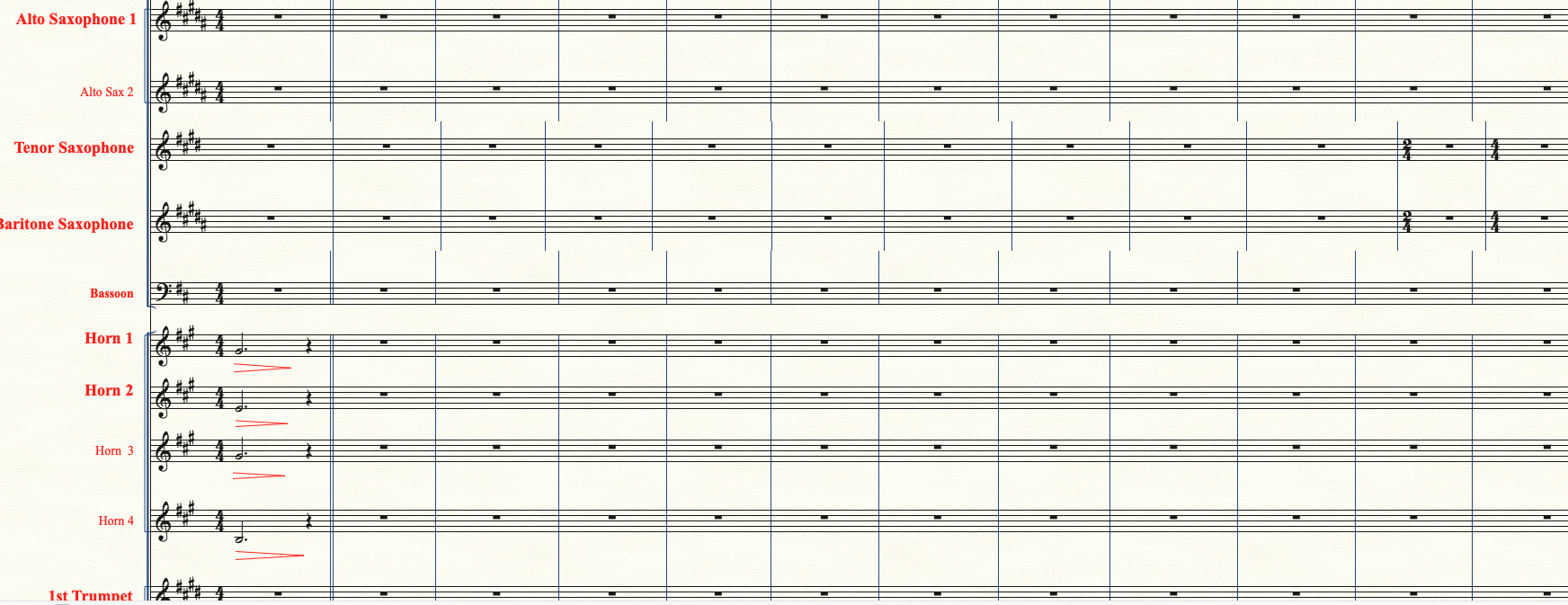
When using Control E to switch between "page views", I get mis-aligned vertical bar lines as per attachment.


Any ideas?


Thanks


7 comments

Date Votes
Avatar
0

My first guess:


View menu > Redraw Screen

Comment actions Permalink
Avatar
0

Thanks Peter for the quick reply.  I have tried this and it is a temporary cure only.  It's a strange but regular problem which I have put up with for several months now!!!

Comment actions Permalink
Avatar
0

Ian Jones,


Just an idea:

Take a look in

Preferences - Edit

Is the option

Automatic Update Layout

selected or de-selected?

Comment actions Permalink
Avatar
0

Ian,

What do you mean by temporary?

How temporary?

Comment actions Permalink
Avatar
0

Peter...................it was "unticked", so I will try that today.


Adrian.................It's usually two or three times a day, so I will give Peter's suggestion a go.

Comment actions Permalink
Avatar
0

Help me try to picture this.


  1. When you switch between (certain) page views, you see misaligned bar lines.
  2. You apply Peter's suggestion (redraw), and that fixes the problem.
  3. After that, does the problem occur and need fixing every time you switch page views? Only with switches between certain page views or types of page views? Are we talking of switching between zoom sizes, scroll to page view, subsets of staves, or something else?


Is Automatic Update Layout currently selected or not?

Comment actions Permalink
Avatar
0

1. Correct (as per the initial picture)

2. Yes. The problem occurs when I move from one part of the scroll view to another...but it is intermittent.

3. Working in scroll view, I just Control E to Page view and ControlE again to get back to scroll view. This corrects mis alignment.   (until the next time)

When I looked at Preferences "Automatic Update Layout" was not ticked.  I tricked it. When I saved and later returned to the file, it was again unticked. So I deleted Preference  file and started again ( a pain!!) and the AUL box remained ticked. However this did not solve the problem.

Thanks for your interest!!

Comment actions Permalink

Please sign in to leave a comment.