Nueva publicación
Avatar
0

Hi Finale specialists,
where can I find the expression  s f f ?
Thank you and regards LO

WIN 10, FIN 26,3

6 comentarios

Fecha Votos
Avatar
0

Just create it yourelf. Open up the "sf" expression. Duplicate it. Now add the "f" at the end and you're done.

Acciones de comentarios Permalink
Avatar
0

Hi Jeffrey, thank you for your quick answer. But your idea is not the solution for me. The expression should look like the right example, more compact without this ugly gap. Maybe someone knows a solution for the problem.

Thank you and regards LO

WIN 10, FIN 26,3

Acciones de comentarios Permalink
Avatar
0

Youn may have inadvertently added a hard space at the end. Try placing the cursor between the s and the f and add an f there.

Acciones de comentarios Permalink
Avatar
0

Lothar you will have to create it but it can be very simple and no special hoops to jump through.
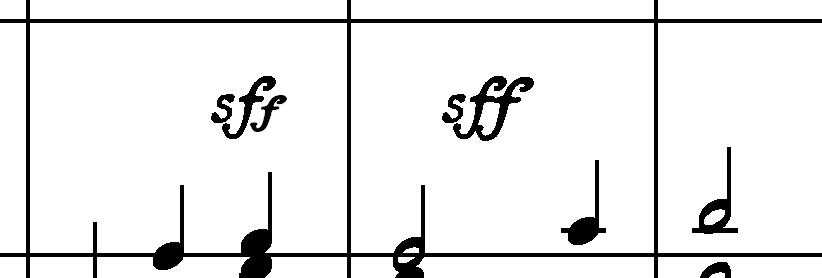
  Copy the sf marking so you now have two of them. Select the f marking and ctrl-c it.  Now simply paste, ctrl-v, the copied f to the end of the new sf.   You can even change the size of the second f if you so choose.

Acciones de comentarios Permalink
Avatar
0

Thank you to all for your answers!

But now there is a new question: How to make the expression rf (rinforzando)?

Thank you LO

Acciones de comentarios Permalink
Avatar
0

… How to make the expression rf (rinforzando)? …


There is a ready made rf expression in the default file (Maestro Font Default).

The rf is composed of two characters from the Maestro font.

Acciones de comentarios Permalink

Iniciar sesión para dejar un comentario.