Nueva publicación
Avatar
0

Windows 10 with Finale 2012

Hello!

Bach wrote his 5th cello suite (Eb major) with "scordatura" (the A string tuned down a tone). This requires a different key signature when playing on the A string because we read the notes according to the finger position and not according to how they actually sound. So Bach used a key signature of Eb major (3 flats) but with two natural signs corresponding to the A and E on the A string (above the stave). How can I reproduce this ? The non-standard non-linear key signature tool does not put in "natural" signs so I'm lost on this one. MANY THANKS.

8 comentarios

Fecha Votos
Avatar
0

Scordatura can be done with Finale, but we need more info from you:


1) Layout or playback? Or both?


2) What should the key signature look like?

Your description is a bit un-clear.

Could you perhaps attach a graphic showing the key signature?

Acciones de comentarios Permalink
Avatar
0

Thank you Peter for your rapid reply.

Just layout - no need for playback.

The key signature would look like a normal bass-clef Eb major, but with the addition of 2 natural signs: one on the top line of the stave (this is the stave line corresponding to the pitch "A" in the bass clef), and the other one a fifth higher, i.e.two lines above the stave (which is the position corresponding to a high "E" in the bass clef).

I hope this is clear - otherwise I certainly will get out the scanner and draw a diagram!!

MANY THANKS


Acciones de comentarios Permalink
Avatar
0

Ian Swedlund,


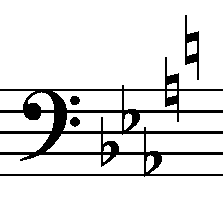
Take a look at the attached image.

Is this what you mean?

Acciones de comentarios Permalink
Avatar
0

YES. Exactly that! Now looking forward to finding out how you did it ........

Acciones de comentarios Permalink
Avatar
0

1. Find out the clef number for the Bass Clef in your document (the Bass Clef is probably Clef 3):

Document menu > Document Options > Clefs > Clef Designer…

Finale numbers the clefs from left to right, beginning with zero.

The default is: Treble = 0, Alto = 1, Tenor = 2, Bass = 3

Note and remember that your clef (= Bass Clef) is Clef 3 (probably).


2. Key Signature Tool.

Double-click the first measure. The dialog box Key Signature appears.

In the pop up menu at the top, choose Nonstandard…

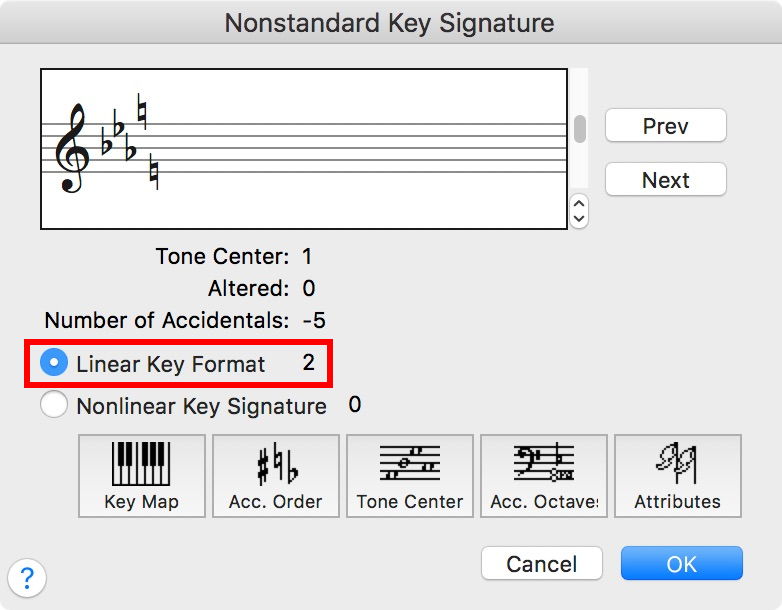
The dialog box Nonstandard Key Signature appears.


3. The first two Linear Key Formats (= 0 and 1) are “hardwired”.

Click the button “Next” twice to navigate to Linear Key Format 2.


4. Use the vertical scroll bar to go to 5 flats.

The five flats are - in “Finalespeak” - called Unit -1, Unit -2, Unit -3, Unit -4, Unit -5 (negative numbers).

The last two flats (= Unit -4 and Unit -5) should have their scale step level changed, and they should be changed to naturals.


5. Click the button “Acc. Order”.

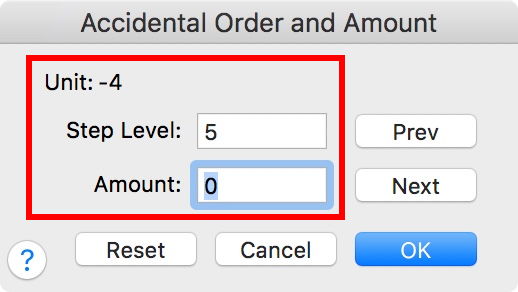
The dialog box “Accidental Order and Amount” appears.

Click the button “Prev” 4 times, to navigate to Unit -4.

Set the Step Level to 5 (= A; step level 0 is C)

Set the Amount to 0 (= natural).

For Unit -5, set the Step Level to 2 (= E), and the Amount to 0 (= natural).

Click OK to return to Nonstandard Key Signature.


6. Click the button “Acc. Octave”.

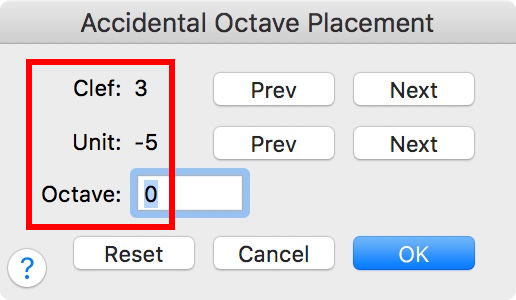
The dialog box “Accidental Octave Placement” appears.

Navigate to the Bass Clef (probably Clef 3).

Click the button “Prev” 5 times to navigate to Unit -5.

Change the octave to Octave 0.


I hope that this is clear?

If not, ask again.

Acciones de comentarios Permalink
Avatar
0

Dear Peter. Everything is perfect till step 6, which doesn't work at all.

At the end of step 5 all I need to do for a perfect outcome is:

    1. change the treble clef to bass (the dialog box refuses to change that treble clef to any other clef)

     2. move the low E natural accidental to above the stave, but the dialog box refuses to do that even though I follow your instructions to the letter

We are almost there ...... thanks again!!

Acciones de comentarios Permalink
Avatar
0

Actually the clef is fine, the only remaining problem is that natural on the -5 unit which won't jump up above the stave

Acciones de comentarios Permalink
Avatar
0

Ian Swedlund,


You wrote:

“At the end of step 5 all I need to do for a perfect outcome is:
1. change the treble clef to bass (the dialog box refuses to change that treble clef to any other clef)
2. move the low E natural accidental to above the stave, but the dialog box refuses to do that even though I follow your instructions to the letter”


In the dialog box Accidental Octave Placement there are two buttons named “Next”.

The upper “Next” button navigates between the clefs (and so does the upper “Prev” button).

The lower “Next” button navigates between the accidentals (and so does the lower “Prev” button).


Use the upper “Next” button to navigate to the Bass Clef (= click 3 times until it says Clef: 3).


Use the lower “Prev” button to navigate to Unit -5 (= click 5 times until it says Unit: -5).


In the Octave field, type 0 (zero).


In Other Words:

The dialog box should say

Clef: 3

Unit: -5

Octave: 0

(See the red rectangle in my screen shot)


NB:

The dialog box Nonstandard Key Signature always displays Treble Clef.

Do not worry! - just click OK out of it, and return to the score.

Acciones de comentarios Permalink

Iniciar sesión para dejar un comentario.