Finale Print Music 2011
Hi - I want to know how to introduce 4 staves after solo voice. I don't need the extra staves there when there is a soloist in the beginning. Say - bar 16. I CANNOT FIGURE OUT HOW TO DO IT!
Trisha


You may (or may not) be out of luck.
PrintMusic is not supposed to have that option - hiding empty staves is “for the full Finale only”.
However, older versions (by mistake) had the option.
In the newer versions of PrintMusic the program works in a different way, and you can not hide empty staves with the old trick.
The old trick involved optimizing the score - I am not sure whether PrintMusic 2011 is old enough.
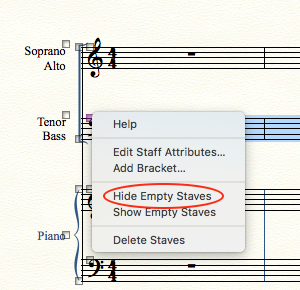
In newer versions you can hide empty staves with a staff style.
Staff styles are document specific (not program specific).

I can't see how to insert staves for just a portion of the document for Print Music 2011.
Nothing with the staff tool. Same with hiding staves. It hides them for the entire document.
I need to know if 2014.5 allows either 'inserting staves for a portion of the document ' or 'hiding staves for a portion of the document'?
You don't, in PrintMusic (or any other Finale product.) You add them for the entire score, and hide them where you don't want them.
Here's a link to a tutorial I wrote a few years ago.
http://www.specialmillwork.com/finale-tips-and-tricks/hiding-staves-in-printmusic.pdf
I think this will work in PM 2011. I can't check it on my computer, because it's no longer supported due to OS updates.

Heres the user manual for 2014 (2014.5). Type Show hide staffs in the search box to find the directions you are looking for.
https://usermanuals.finalemusic.com/PrintMusic2014Win/PrintMusic.htm
Iniciar sesión para dejar un comentario.
10 comentarios
Fecha Votos