Nueva publicación
Avatar
0

 Note: I have all the latest updates from Microsoft for Win 8.1.


Here is what the problem is:
and the previous page is fine looking like this:

All I did was extract all parts.....

Anybody with a solution I can try. This is a fresh install of Finale PrintMusic 2014


Thanks

Email: mmihacsi@frontier.com


2 comentarios

Fecha Votos
Avatar
0

I do not understand why you extract parts.

PrintMusic has linked parts.

Why do you use extracted parts instead of linked parts?

Since extracted parts are created from linked parts, you can not avoid generating linked parts in the document.


Anyway:

The program automatically creates new systems/pages as needed.


The culprit is the document settings for the formatting of new systems/pages.


I am not sure whether PrintMusic can access these document settings.

All the following is for the “full Finale”:


In the “full Finale” you go to

Document menu > Page Format > Parts…


NB: Correcting the settings in Page Format for Parts only affects the formatting of new systems/pages.

To update already existing systems, either

- use the Page Layout Tool, Page Layout menu > Redefine Pages > …

or

- generate linked parts again

Acciones de comentarios Permalink
Avatar
0

Although Peter's solution is correct, if you need a quick-and-dirty solution...

  1. Go to the Linked Part in question (or open the affected extracted part).
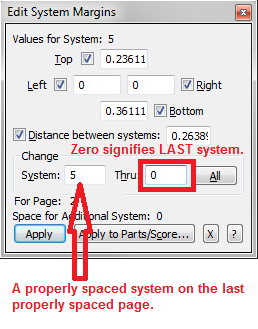
  2. Go to the last properly-spaced page.
  3. Choose the Page Layout tool.
  4. Select the edit handle of a properly spaced system.
  5. If it is not already visible, select the Page Layout > Edit System Margins option.

  6. Set the Thru box to zero.
  7. Click Apply.

You can then use the Page Layout tool to make any minor adjustment to the resulting page(s) if necessary.

Acciones de comentarios Permalink

Iniciar sesión para dejar un comentario.