Nueva publicación
Avatar
0

Mac High Sierra ... Finale 25.4.1.164

In a multi staff situation, how do I hide one or more measures ?

I have managed this in another file but cannot reproduce it.

Any help gratefully received.

15 comentarios

Fecha Votos
Avatar
0

There is  staff style for that : Hide Staff Cutaway (Apply a staff style via the Staff menu).

Acciones de comentarios Permalink
Avatar
0

Thank you for your reply, Michel.

No luck with "Hide Staff Cutaway". Previously, with my successful cutaway, I note that the style name was "normal notation:" (I achieved it quite by accident).

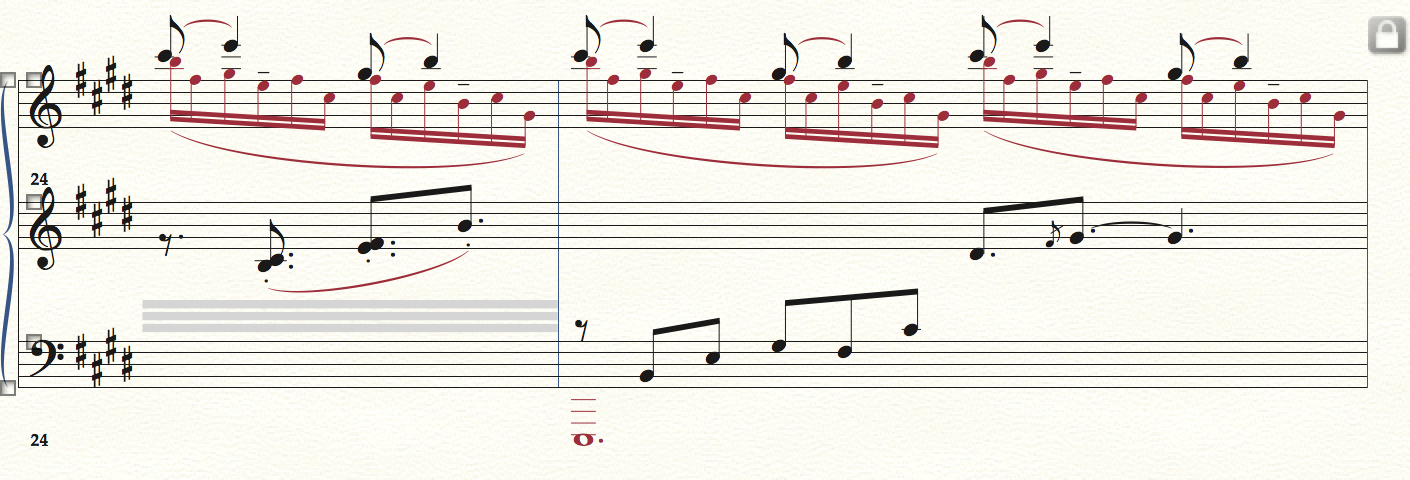
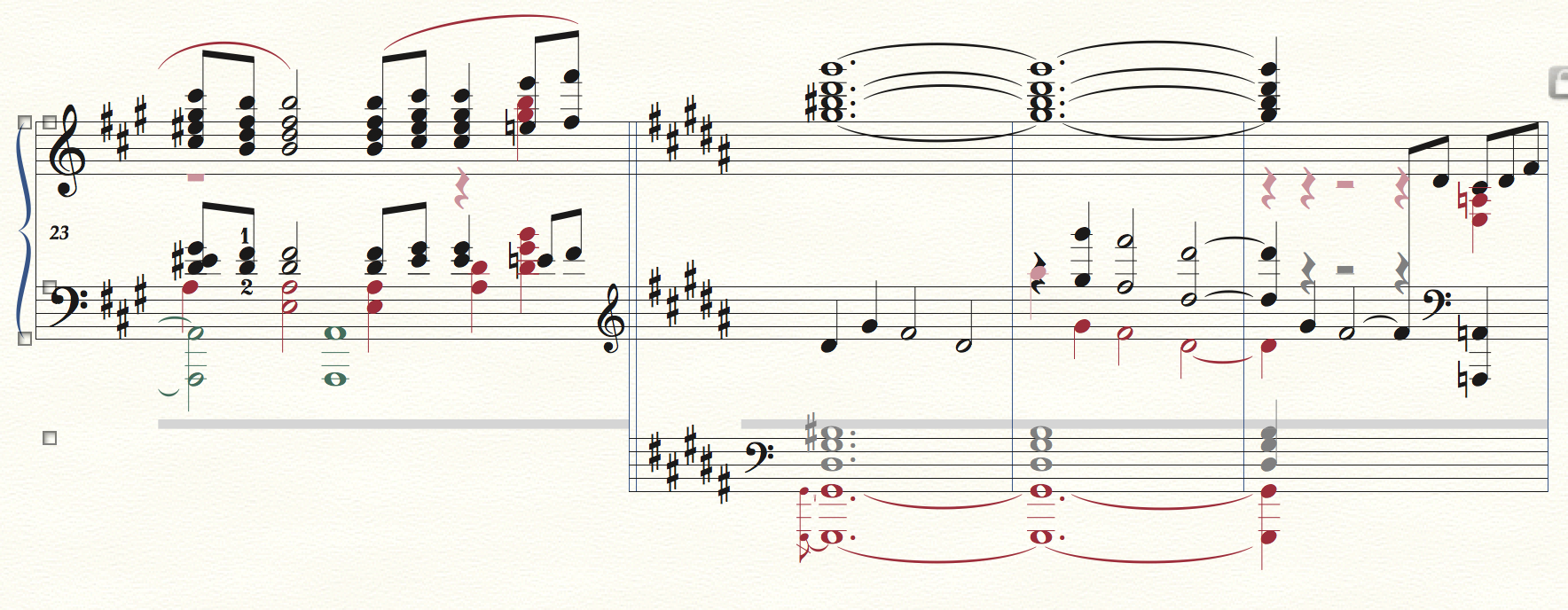
Here are the two excerpts : in the first I am trying to hide bar 24... (I wonder what those grey lines are for).
Acciones de comentarios Permalink
Avatar
0

These gray lines signal the presence of other staff styles, probably unnecessary.

One of them may prevent from using Cutaway.

Select measure 24 and delete these staff styles (Clear key on the Mac numeric keypad, or via the Staff menu).

Select measure 24 and apply the Cutaway staff style.

Acciones de comentarios Permalink
Avatar
0

Thank you for your patience, Michel.

Still no luck I am afraid.

My former successful attempt at hiding was a result of creating an ossia and that shows : Hidden staff (auto created on conversion).

In addition, the preceding measure displays something really weird : layer one became greyed out and I had to move to other layers to make it work.

Acciones de comentarios Permalink
Avatar
0

I'm not sure I can understand what's going on without seeing the score. It seems impossible to attach a Finale file here. Could you post an excerpt on Dropbox or somewhere else ?

As a general remak, ossias are to be avoided, they are limited and create problems.

Acciones de comentarios Permalink
Avatar
0

I'll try to extract the difficult page and post it on my dropbox. To whom should I send the link ?

Regarding the ossia, I hacked my own by just downsizing it to 80%, not including those bars in the measure numbering.

Acciones de comentarios Permalink
Avatar
0

Post the link here even temporarily.

Acciones de comentarios Permalink
Avatar
1
Acciones de comentarios Permalink
Avatar
0

I downloaded your file, opened it and found out that the list of your staff styles looked incomplete. I loaded the default Staff Styles into the document, which included Force Hide Staff (Cutaway).

I cleared all staff styles in measure 24 and applied Force Hide Staff (Cutaway) to that measure. It worked.

Here is a link to the updated file :

https://www.dropbox.com/s/batuh1ngfv559ns/Cloches%20%C3%A0%20travers%20p%201-4.musx?dl=0

I hope this will help.


P.S. : in your staff styles, you had 2 hidden staff styles, but neither of them had in their definition the "hide -> cutaway" box checked.

Acciones de comentarios Permalink
Avatar
0

Thank you, Michel.

I downloaded the updated file and saved the styles file in my libraries; after importing it, this is now operational and the problem is solved.

Musically yours.

Ray 

Acciones de comentarios Permalink
Avatar
0
Dear friends,
I have a trio the staves order Flute, Marimba (percussion) and Cello in Finale 2014D ( Mac), I export to midi file then import to Logic Pro X project the the order has been changed in  Marimba (percussion), Flute and Cello, how can I fix it? 
I remember there is a Instrument Window at  very beginning when we create a new file? we can manager the staves order, change the instrument sounds etc ................. how can I find out? 
thank you!
Acciones de comentarios Permalink
Avatar
0

Why not just fix it in Logic?

Acciones de comentarios Permalink
Avatar
0

It's possible, or  export to MusicXML file, but  I want to find out the Instrument Window. 

thanks! 

Acciones de comentarios Permalink
Avatar
0

"I want to find out the Instrument Window. "


Just in case, as it seems that you might be looking for the Instrument List window, it is now available via Window menu -> Score Manager.

You can change the order of staves there, but if Logic doesn't respect it, you probably should change the order of tracks in Logic itself, as Adrian suggested.

Acciones de comentarios Permalink
Avatar
0

Hello Michel, 

thank you, that is right what I want find out. I have searched " Score manager" from help but it's vain. 

warm regards

Shing-kwei

Acciones de comentarios Permalink

Iniciar sesión para dejar un comentario.