Nueva publicación
Avatar
0

I'm doing lesson documents. The exercises don't need measure numbers, but the example chord progression that I've put at the end of the lesson could use measure numbers. Can I hide measure numbers for the first part of the document, but have measure number show up and start at measure #1 for the final 12 bars in the document?

2 comentarios

Fecha Votos
Avatar
2

Yes, you can do that. With the measure tool, choose "edit measure number regions".

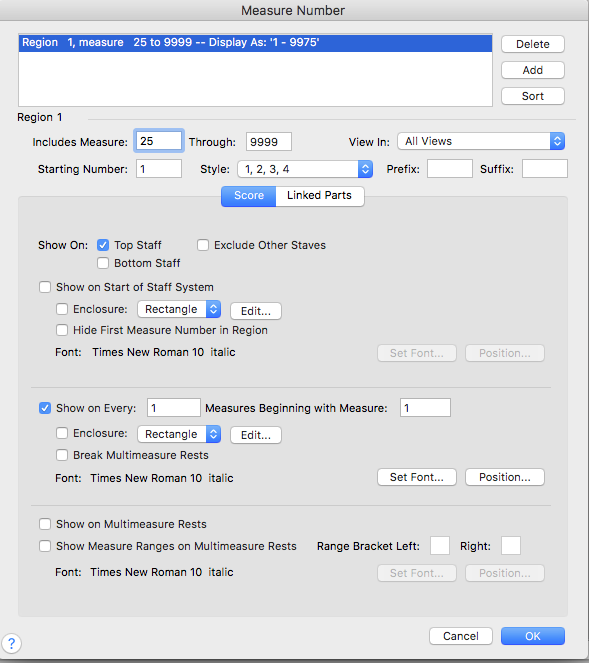
Here's one group of settings that works.

Where you see "includes measure 25 thru 9999". That tells Finale to not start putting measure numbers in until it comes to measure 25. Underneath that, you see starting number "1". That tells Finale when it gets to measure 25, number it as "1".

Underneath that I choose to put measure numbers on all measures.


Use this concept and you should get what you need.

Acciones de comentarios Permalink
Avatar
0

Finale's ability to handle, integrate and customize measure numbers is one of many reasons why it is the de facto standard for Broadway style musical scores and parts. Nothing else comes close for the stage.

Acciones de comentarios Permalink

Iniciar sesión para dejar un comentario.