Nueva publicación
Avatar
0

I'm not sure this has been posted before but I coudn't find any reference to this topic:

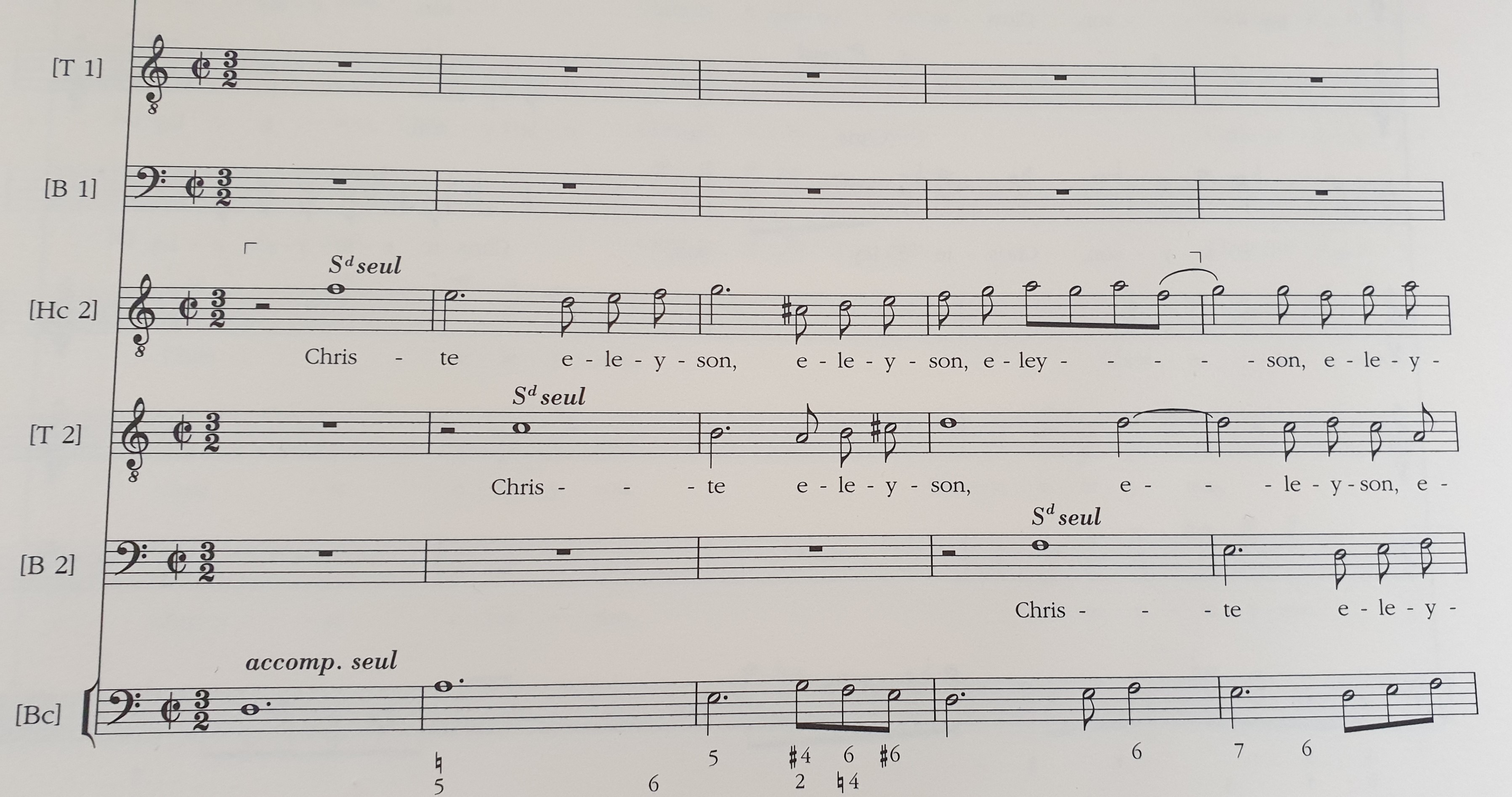
How can I change regular quarter notes into white flagged notes as was custom in French Baroque music in a 3/2 metre?

I appreciate any suggestion!


I have Finale 2014.5  on Windows 10

8 comentarios

Fecha Votos
Avatar
0

I’m not familiar with that. Can you post a picture of what you are looking for?

Acciones de comentarios Permalink
Avatar
0

Please post  picture (jpeg or png) of what you’re looking for. There are a number of people who do specialized antique fonts compatible with Finale.

Acciones de comentarios Permalink
Avatar
0

Acciones de comentarios Permalink
Avatar
0


Use the Change option in the Utilities menu after selecting the measures desired.


(Of course my own motto is "If it ain't Baroque, don't fix it.")

Acciones de comentarios Permalink
Avatar
0

Well done, Adrian!

Acciones de comentarios Permalink
Avatar
0

Thank you for your suggestion, but I'm not there yet:

How does one change a quarter note into a white eighth note? I know I can change a black noteead for a white notehead, but I can only enter quarter notes when I record, and need to change them to white eighth notes... Please advise!


Acciones de comentarios Permalink
Avatar
0

You can enter the notes as (Nothing displaying) tuplets:

1 Eighth in the space of 2 Eighths (instead of entering 1 Quarter)

2 Eighths in the space of 4 Eighths (instead of entering 2 Quarters)

3 Eighths in the space of 6 Eighths (instead of entering 3 Quarters)

Acciones de comentarios Permalink
Avatar
0

Oh that!

Acciones de comentarios Permalink

Iniciar sesión para dejar un comentario.