Nueva publicación
Avatar
0

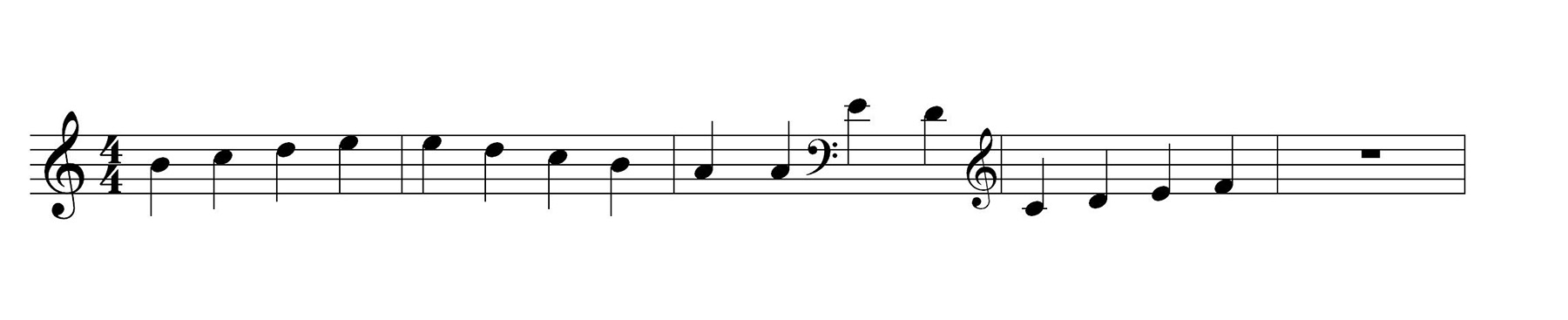
For some unknown reason, changing the clef mid-measure in this document adds an extra space at the end of the measure, as though Finale was placing (but hiding) another clef at the end of the measure. I can see no reason in my Doc Options why this should be. Manual spacing is only a temporary solution because Finale automatically updates its note-spacing regularly and the manual changes are lost (unfortunately). Any ideas will be much appreciated.

For another unknown reason, Finale won't let me upload my small PNG graphic of the measures in question ........

Windows 11 and Finale 27


5 comentarios

Fecha Votos
Avatar
0

You can turn off Automatic Music Spacing on Preferences > Edit.

Acciones de comentarios Permalink
Avatar
0

I am not sure Auto Music Spacing is your problem. Is this what you want? Finale doesn't add any space it doesn't need to add.


Acciones de comentarios Permalink
Avatar
0

Thanks for your ideas, guys.

Mike, if I turn off Automatic Music Spacing, this affects all documents I might open so it's not a practical solution as this is normally a very useful function. As you mentioned in previous posts, it would certainly be great if this function could be document-specific and that would sort me out perfectly.

And Ernest, yes, this is what Finale normally does and it is good, but it's not doing that in this document and I don't know why !

Acciones de comentarios Permalink
Avatar
0

Have you tried setting the Music Spacing option in Document Settings to "Incorporate"?  If you are working with a document that you didn't create, or was created with a different version of Finale, this setting might be set to "Ignore" or "Clear".


I'm not sure this will fix your issue, but I'm thinking this setting exists to deal with manual positioning of items when the spacing is recalculated/updated...?


Acciones de comentarios Permalink
Avatar
0

Ian you can send the file to me or MikeR perhaps one or the other of us can figure what is going on.
Check MikeR sig.
mine is e e biggs1 at gmail dot com using conventional email verbiage and no spaces

Acciones de comentarios Permalink

Iniciar sesión para dejar un comentario.