Nueva publicación
Avatar
0

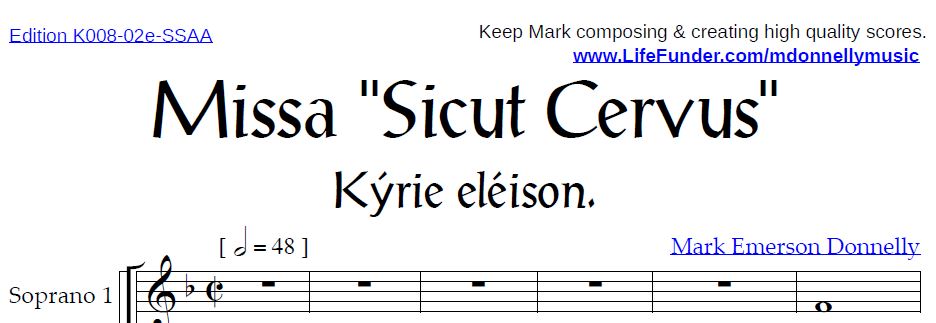
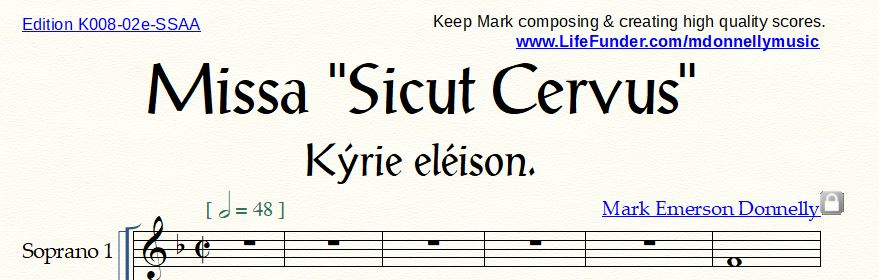
I recently got the Finale v.27 after using v. 26 for a few years.  I have underlined text in text boxes on my scores, but now, whenever I print my score to PDF, instead of the underline being a pixel space or two under the text, the underline gets right next to the text and it looks so weird.  It's in the pixel RIGHT below.    How can I fix this?  It looks just fine on Finale before I print to PDF.

Windows 10

Finale Version: 27.4.1.110
12 comentarios

Fecha Votos
Avatar
0

Here are the before and after pictures

view in Finale

View in PDF reader after printing to PDF.  I've tried both Adobe and Nuance Power PDF


Acciones de comentarios Permalink
Avatar
0

How are you creating the PDF? Finale’s output has been flaky for quite some time. You might try exporting through the Graphics tool, or use one of the free PDF printers available for Windows.

Acciones de comentarios Permalink
Avatar
0

I am using Bullzip PDF Printer.

Acciones de comentarios Permalink
Avatar
0

Try the graphics tool. Are the underlined text inserts hyperlinks?

Acciones de comentarios Permalink
Avatar
0

It looks the same if I print using the Export to PDF. 

How do you export using the graphics tool?

Acciones de comentarios Permalink
Avatar
0

Wait, if I export it as a graphic, would I then convert the image to a PDF?

Acciones de comentarios Permalink
Avatar
0

Okay, I just exported it through the graphics tool, and PDF was one of the options.  But it still looks the same, with the underline too close.

Acciones de comentarios Permalink
Avatar
0

Oh, and yes, the underlined texts are hyperlinks.  But since the links don't work for some reason, I add them in Power PDF afterwards.

Acciones de comentarios Permalink
Avatar
0

That may be the cause. I'd send it in to tech support. Use the Submit a Request tab at the top of the page.


Can you enter the hyperlink text after you generate the PDF? Just leave it out of the Finale file?

Acciones de comentarios Permalink
Avatar
0

I took away the hyperlink and just underlined the text in Finale.  Same thing happened.  It's an underline problem.

When I add the underline to the text in Adobe Reader, it's all fine. I take the underline away from the hyperlink and add it back in. 

Acciones de comentarios Permalink
Avatar
0

Don't underline the text in Finale. You could even leave it out, and just add it in as a hyperlink in the PDF. I'm assuming you are the only one with access to the Finale file, and you would only distribute the PDF.

Acciones de comentarios Permalink
Avatar
0

What font and size are you using? Some fonts and sizes do not behave when saved as PDF.


A PDF file can be a picture of a page or it can be a set of instructions using a set of embedded fonts—that is what is happening here.


I suggest trying Minion Pro. It is sandboxed in every Adobe product, even the free Reader, but there are ways to make it available to all applications in Mac & Windows. Being an Adobe font, this should help pinpoint the problem.

Acciones de comentarios Permalink

Iniciar sesión para dejar un comentario.