Nueva publicación
Avatar
1

Is there a way to get rid of rests in empty measures permanently??

8 comentarios

Fecha Votos
Avatar
0

You can change them to real whole rests, and hide them.

Acciones de comentarios Permalink
Avatar
0

found it: Staff tool  double click desired staff   Staff attribute box appears   Deselect Display rests in empty measures     click ok


It's not permanent though. Not sure why finale puts rests in empty measures as a default.

Acciones de comentarios Permalink
Avatar
0

P.S. I got an email with a comment but I don't see it here. Thanks anyway...

Acciones de comentarios Permalink
Avatar
0

The default whole rest adheres to notational standards. It is not a "real" rest as this whole rest appears regardless of time signature. It is permanent in the sense that when "not displayed" the program does not generate it on the staff (and vice versa). If you want to hide real rests (i.e. rests in the context of time signatures), select the rest and hit "h" on the keyboard; that should make it invisible.

Acciones de comentarios Permalink
Avatar
0

>>  P.S. I got an email with a comment but I don't see it here. Thanks anyway...


As part of its spam protection, some messages are delayed for approval but apparently go through the e-mail notification system without delay. It's sometimes irritating (makes it look like one poster is just parroting another), but there is a reason for it.

Acciones de comentarios Permalink
Avatar
0

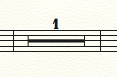
How do I put the number 1 over a whole bar rest? The default is nothing.

Acciones de comentarios Permalink
Avatar
0

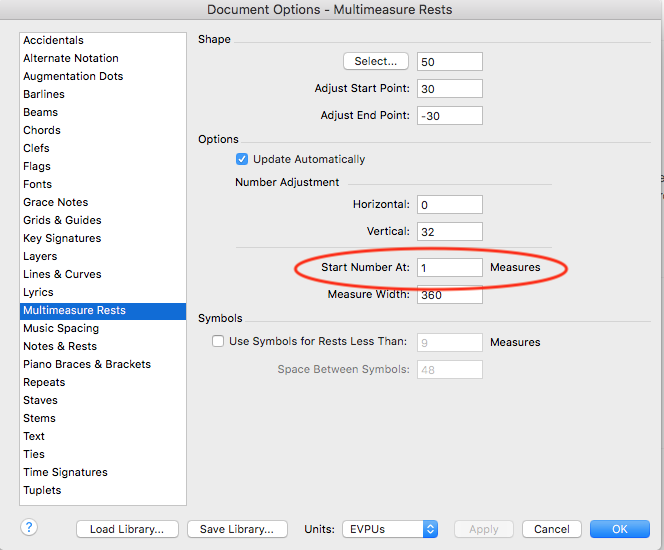
Document Options > Multimeasure Rests > Start Numbers at: 1 Measures


Acciones de comentarios Permalink
Avatar
0

DAVID SPRUNG:

On a Mac it is Document Options - Multimeasure Rests - Start At Number (Set at 2 by default)


Simon

Acciones de comentarios Permalink

Iniciar sesión para dejar un comentario.