Hello, I am having trouble figuring out how to make an eighth note triplet set with two 16th notes and a quarter note.
I am on Windows 10 finale v. 25


There are lots of ways to create triplets. Here's the way I usually do it in Speedy Entry.
When you press CTRL+3 in Speedy, the first note you enter sets the "denomination" of the triplet, but then you can overwrite the note's duration.

In Simple, I set my tuplet definition to 3 eighths in the space of 2 eighths.
Then, it was a simple matter to enter the first note, tap the 9 key, and enter the others. Occasionally, there was an extra 16th rest showing when I finished, but it seemed to be a visual artifact, only. As soon as I entered the first note of the next tuplet, it disappeared. I use the numberpad to set the durations: 3 for a sixteenth note, 5 for a quarter.
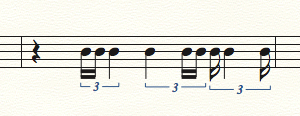

In Speedy:
press Opt.-1 (alt-1) FWIW, I'm on a Mac
The tuplet definition box appears. Make sure it says "3 8ths in the space of 2 8ths" (that's mathematically what you want).
Now that the tuplet definition has been set, just enter 2 16th notes and a quarter. That should do it.
Iniciar sesión para dejar un comentario.
3 comentarios
Fecha Votos