Nueva publicación
Avatar
0

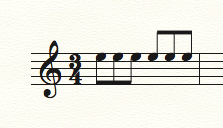
For the life of me, I cannot see how to flip a beam so that it is below the notes instead of above.

I have three beamed notes in a bar, but the Help does not seem to say how to use a tool in the Special Tools area to do this.

Can someone help?

Thanks.

Mac

4 comentarios

Fecha Votos
Avatar
0

No Special Tool needed. Select any of the three notes, and tap the L key.


Acciones de comentarios Permalink
Avatar
0

I actually found this by doing a few more searches on the net.  

Speedy Entry tool>Click on the first note of the beamed area>Press L.

Now, there are a couple where the beam is too low.

But this time, the net gives me no clue on how to manually raise the beam just a bit.

Help?

Acciones de comentarios Permalink
Avatar
0

The Beam Angle Tool (in Advanced Tools) lets you adjust not only the angle of the beam but also the distance of the beam from the notehead depending on which handle you choose.

Acciones de comentarios Permalink
Avatar
0

Ah, there it is.

Thank to both of you.

Acciones de comentarios Permalink

Iniciar sesión para dejar un comentario.