Nueva publicación
Avatar
0

I am using Finale 2012 with Garritan Personal Orchestra 4.  I would like to use the mixer in ARIA Player in "set and forget" mode where I set it for an entire piece rather than at specific places in a piece.  Right now for a piece it is changing mixer settings as it goes along playing a piece as a consequence of having set things when the piece was stopped at different places.  How do I erase these all settings and have ARIA keep the settings constant for the entire piece?

7 comentarios

Fecha Votos
Avatar
0

Hi Martin,


If the mixer level settings are changing during playback, this is going to be triggered by something outside of the ARIA Player. The Player itself does not have not have automation built-in to it. If you are using the ARIA Player in Finale, Human Playback can trigger this. Also, if you are using the Player with a DAW, this can be controlled with MIDI CC 7. 

Acciones de comentarios Permalink
Avatar
0

Thanks.  I'll check this.

Acciones de comentarios Permalink
Avatar
0

Nope.  I'm afraid that turning off Human Playback in Finale did not solve the problem.  What do you mean by "using the player with a DAW"?

Acciones de comentarios Permalink
Avatar
0

Finale users should use the Mixer in Finale (CTRL+SHIFT+M) to set base levels (balance one instrument against another). Then all dynamic changes will take place in reference to those base levels.


The only way to play Finale through Aria with NO changes in levels is to create a copy of your file, wipe all dynamics out of it, and set relative levels in the Finale Mixer (and perhaps set HP to None as well). If that is your goal, I assume this would be a working file, not a performance file.

Acciones de comentarios Permalink
Avatar
0

    I should give more details of what I am trying to do.  I am wanting to change the channel in ARIA in the middle of a staff (e.g., an oboe player switches to a cor anglais and later back to an oboe).  I am doing this by creating an expression (e.g., "change to cor anglais") under "technique text" which under "playback" does (change) "channel" and "set to value n", where n is the number of the channel in which I have loaded the cor anglais in ARIA. 
    The Finale mixer only sets the base level for a given line in the score.  That works OK.  However, I am trying to set the relative levels of different channels in ARIA.  That's where things go awry.  I set a channel in ARIA to -10 dB, say.  But then when that channel gets switched to in Finale (e.g., where the oboist switchs to cor anglais) various things go wrong in the playback.  The most common problem is that the instrument plays back at 0 dB even though the ARIA slider is at -10 where I set it.  If I merely click on the ARIA slider WITHOUT MOVING IT the volume level of the instrument immediately jumps down to -10 dB and sounds the way I want it.  Another problem is that when Finale playback gets to the place in the piece where the player switches instruments, the ARIA slider suddenly jumps up to a higher level.  Then I can have the ARIA sliders moving up and down with lives of their own as a piece.
     I have been a Finale user for two decades now so I've been through many versions.   I first encountered these sorts of ARIA playback problems when GPO first came out (15 year ago?)  At that time I read comments by people saying that instruments would suddenly come in the first time at the wrong volume.  I assumed that that was a bug of the early releases and would get fixed in later editions.  However, I am still encountering this problem.  I am surprised that I can't find a ready solution to it in any documentation.   I think that what I am trying to do is fairly basic (switch instruments in a line and have them play at an expected volume) and that there ought to be an easy fix.  I've been assuming that a solution exists and my problem is just that despite many years of using Finale I don't have a deep enough knowledge of the inner workings of Finale and ARIA to have found the solution.
     I can solve my play back problems described by creating a separate playback version and adding in extra lines for every instrument change, but I regard this as a very inelegant solution.  Simply changing the channel in a line should work.  It has been a Finale option for ages.

Acciones de comentarios Permalink
Avatar
0

Martin, thank you for the additional information. As you are generating music from Finale, you may find you get more suggestions for this question by posting on the Finale Questions forum (perhaps in addition to here). (I only looked in on this forum as a lark.)


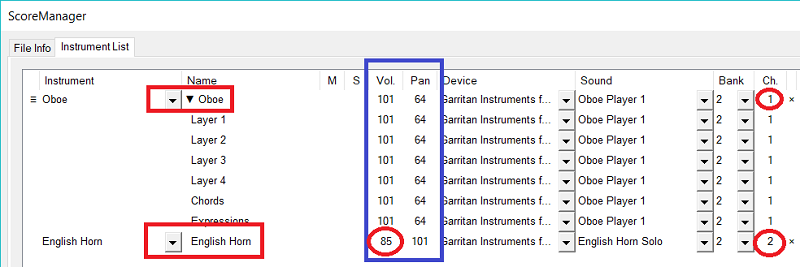
Depending on which version of Finale you are using, The latest 3 at least offer a "Change Instrument" option in the Utilities menu. That allows you to change the instrument on a given staff without using an expression. The added benefit is that the additional instrument shows up in the Score Manager and has its own MIDI channel and Aria slot.


Notice as well that you can alter the Volume and Pan of the added instrument in columns you can add via the "Customize View" button lower on the Score manager Panel. These settings have the same affect as changing the Finale Mixer, but they can be different for the two instruments whereas the Mixer slider does not display that flexibility.


I hope some of this is helpful. Presumably you were combining instruments on one staff to save space rather than because you had run out of Aria slots.

Acciones de comentarios Permalink
Avatar
0

Many thanks for the info.  This sounds very promising.  I'll give this a try.  (I had not noticed the "Utilities -> Change Instruments" option.)
Yes, I was combining instruments on one staff to save space. 

Acciones de comentarios Permalink

Iniciar sesión para dejar un comentario.