Nueva publicación
Avatar
0

windows 10.. Finale version 25

I'm writing a big band arrangement and want to include chord symbols above the sax solo.    When I play it back there are sounds interfering with the sax line.  I'm assuming they have something to do with the chord  symbols.    Why is this?...... any one know   how I can  eliminate those chord sounds?  Thanks ... S

2 comentarios

Fecha Votos
Avatar
0

You have two solutions possible.

1. In the Chord Tool, go to the Chord Menu and turn off Enable Chord Playback. This will do that for the entire document, and normally, that's what I do.

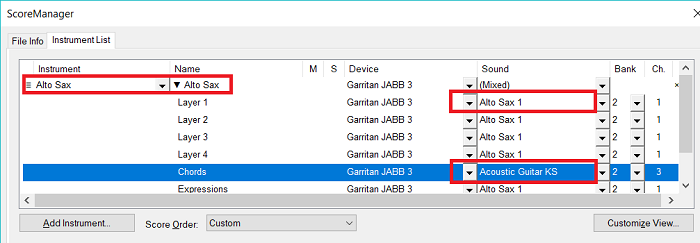
2. If you really, really, REALLY want Finale's stupid hamfisted voicings in your piano and guitar staves to play back but not in the sax staff, you can turn off chord playback JUST for that staff. Hit Cmd-K (on Mac; for PC probably ctl-K) to open the Score Manager. Click Instrument List if the list of instruments is not showing. Under the Name column, go to the sax staff and click the triangular arrow you see there. One of the items is Chords. The column to the right of Name is called M for Mute. Click it beside the Chords to mute chords.

Acciones de comentarios Permalink
Avatar
0

You can also use Christopher's solution #2 to change the instrument (in the right-hand column) used for chords to something that will not compete with the sax sound.


Acciones de comentarios Permalink

Iniciar sesión para dejar un comentario.