Nueva publicación
Avatar
0

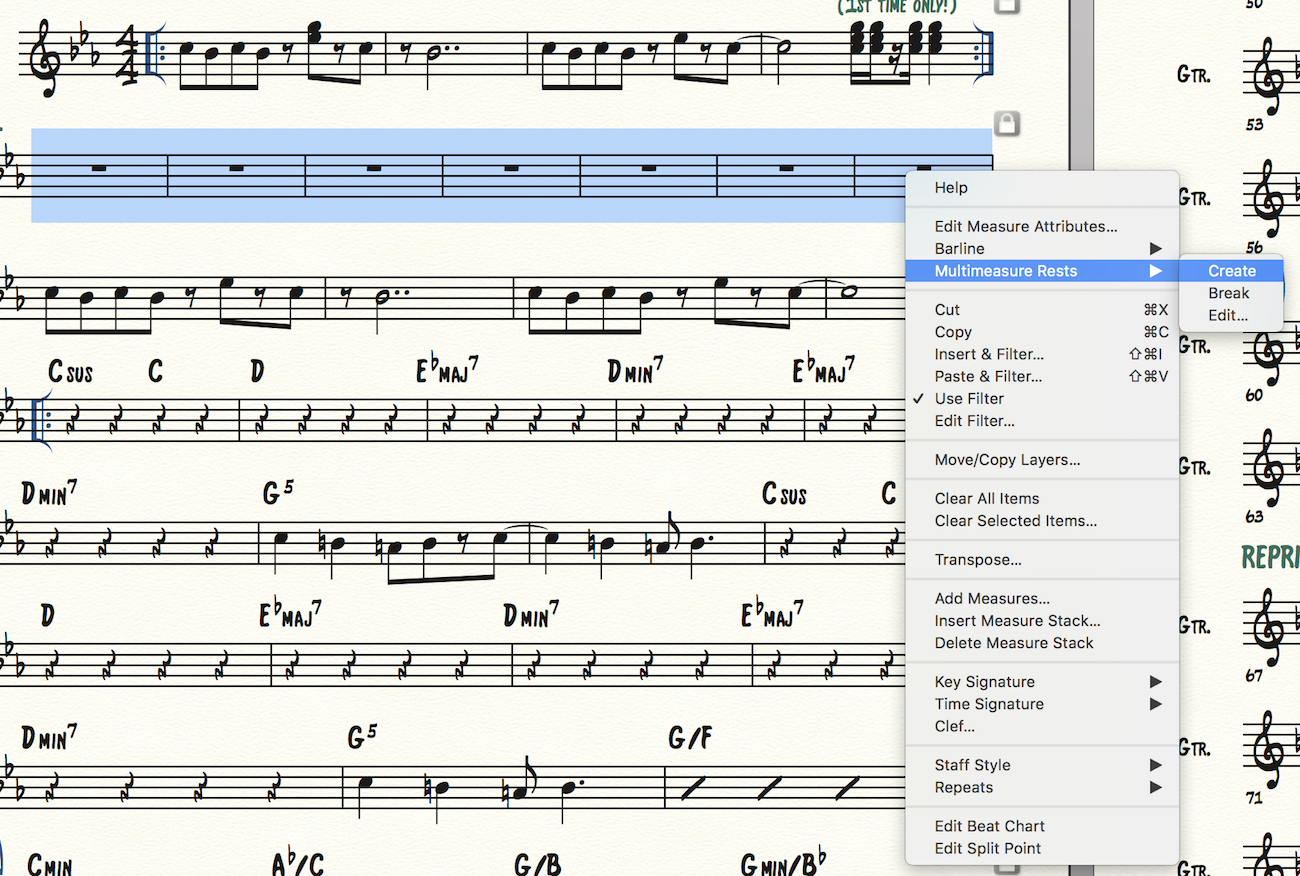
 I'm using Finale 25.5.02.59 for Mac OS 10.13.5 and can't create multimeasure rests. I've tried right-clicking and selecting the multimeasure rest function (see screenshot), and I tried double-clicking using the staff tool and deselecting Display Rests in Empty Measures as another person suggested. Can anyone help?
 

2 comentarios

Fecha Votos
Avatar
0

The measures should be empty, no "entered" rests.

Acciones de comentarios Permalink
Avatar
1

There are several possible culprits that could break a multimeasure rest:


1) Measure Tool.

Double-click the measure.

If the option “Break a Multimeasure Rest” is selected, then the measure’s right barline will break a multimeasure rest.


2) An expression can be defined to, “Break Multimeasure Rests”.

This means that the expression will break multimeasure rests in all the measures where the expression is added.


3) A staff style with Alternate Notation (such as Slash Notation, Blank Notation, One-Bar Repeat, Two-Bar Repeat) will break a multimeasure rest.


4) The measures must be truly empty (as Michel Herr points out) so that they only display default whole measure rests, not real whole measure rests.

Among the default Finale plug-ins are the two plug-ins {Change to Default Whole Rests} and {Change to Real Whole Rests}.

Acciones de comentarios Permalink

Iniciar sesión para dejar un comentario.