Nueva publicación
Avatar
0

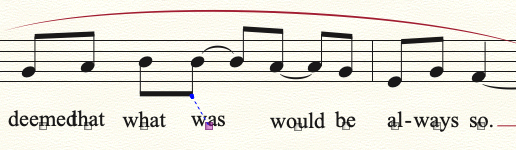
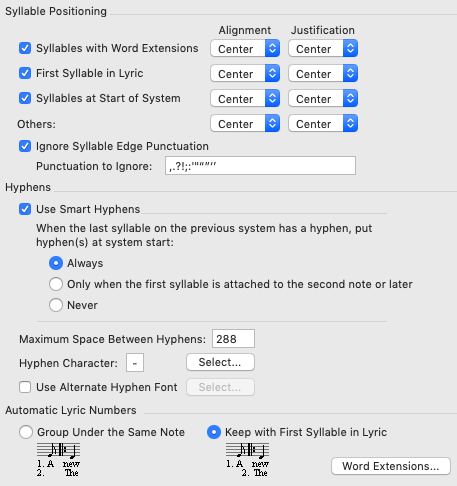
Here are my lyrics settings:
 

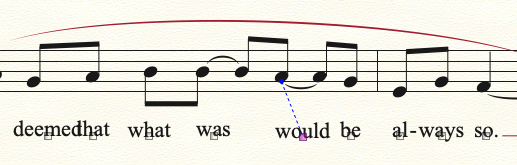
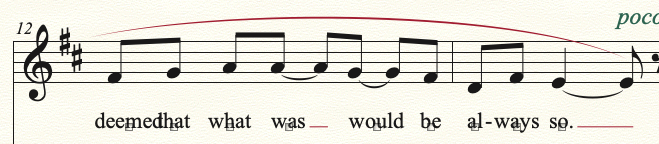
And here is how many syllables behave:
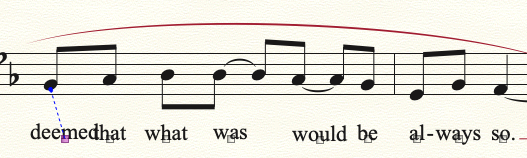
 

Using the arrows to reposition syllables rarely works (especially moving left), and when it does, it can shove notes/expressions in the piano part out of place. Moving the syllables via track pad is far too sensitive and is impossible to keep them horizontally stable. Any tricks to lock syllables in place? Thanks so much,

24 comentarios

Fecha Votos
Avatar
1

Have you Respace Music>Update layout?

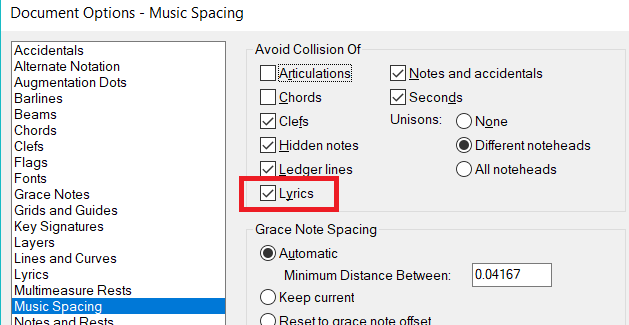
Are your collisions set to include lyrics?

Acciones de comentarios Permalink
Avatar
0

With the Lyric Tool/Adjust syllables active, highlight a word then press clear, it should jump back to the default.

Acciones de comentarios Permalink
Avatar
0

Jeffrey,

Not sure I have a clear button.


Thanks,

Acciones de comentarios Permalink
Avatar
0

Mike,

Is Respace under File or Edit? Or are you referring to Redraw? I save/redraw every 5 seconds. I tried Update Layout and nothing changed.

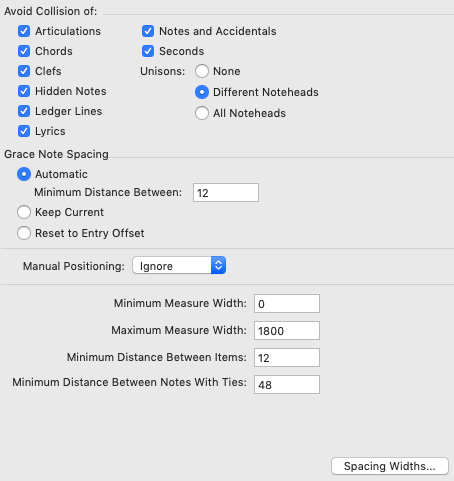
Here are my collisions settings:

I tried checked and unchecked, it didn't change the lyric spacing.

Acciones de comentarios Permalink
Avatar
0

Jonathon,


You asked if there are any tricks to get syllables to lock in place. The clear key is the trick.


If you don't have a dedicated clear key on your computer keyboard, then check to see if there is a keystroke combination which functions as a clear key. I have a Macbook Pro, no clear key, so I use Keyboard Maestro to add that function.


Once you have a clear key, Lyrics/adjust syllables, select all, then press clear. All syllables will have jumped to their default position.


Acciones de comentarios Permalink
Avatar
0
Acciones de comentarios Permalink
Avatar
0

Mike Rosen's solution (above) is always my first choice.

First I have my Document Prefs set to avoid lyrics collisions.


Then I use the Selection Tool to Select All (or just the measure stack involved) and then use Utilities > Music Spacing > Apply Music Spacing option.

Acciones de comentarios Permalink
Avatar
0

Hello J Adrian,

Nothing seems to work on the syllables; here's how it looks after your recommendation:

Acciones de comentarios Permalink
Avatar
0

Sometimes, you have to respace manually. If there is a long word on a short note, none of the automatic tricks will work. You can adjust it with beat spacing or with the mouse shifting the lyric.

Acciones de comentarios Permalink
Avatar
0

The posted screen shot looks spaced correctly to me, but the word "deemed" is not positioned correctly. If the handle to that word was centered directly under the note, I suspect the spacing would work then. 


 have no idea though, why the clear key didn't move this word to its default position.

Acciones de comentarios Permalink
Avatar
0

Have you tried highlighting all with the selection tool and pressing "4"?  

Acciones de comentarios Permalink
Avatar
0

I think the larger point is missed here: in this small example the words "deemed", "was", and "would" are way off position, but big picture, this ratio is true for everything I notate - about 40%-50% of the lyrics need manual positioning, which, with the overly sensitive track pad, is impossible to keep horizontally consistent and takes a ton of time. Stranger too is that the arrows rarely work for repositioning syllables, especially when wanting to move left. In this excerpt, "deemed", "was", and "would" (and several other syllables) don't respond to any arrow input. Considering I work about 7-8 hours a day on Finale, repositioning syllables (and slurs) adds up to a colossal amount of wasted time. The slurs I can understand, but the syllable issue is going to drive me off a cliff one of these days.

Thanks for your help, back to work.

Acciones de comentarios Permalink
Avatar
0

Jonathon,


I use different lyric settings and have never seen this problem before. So I recreated your measures with your settings and had the exact same problem you have. Have you sent this in to tech support? I tried it on Finale 26 and 2012, same problem on both versions.


FWIW, on the word "deemed", when I tried the clear key, it did nothing. Then I manually moved that word slightly, then pressed the clear key again and "deemed" jumped to the correct position.

Acciones de comentarios Permalink
Avatar
0

My deemed bounces right back to the far-right position after moved. I'll send Finale a support ticket and see where it goes.

Acciones de comentarios Permalink
Avatar
0

I tried it and found that the first syllable of a system is normally justified/aligned differently by default (which yours is not).

I suspect your manual tinkering to solve your initial crowding has gotten in the way of automatic spacing.The only manual alteration I can see needed is the "would be" combination, but only the first time through, because I increased the font size to 14 pt.


Acciones de comentarios Permalink
Avatar
0

I didn't tinker with it manually. I'm looking for a solution that requires no manual tinkering, so I screenshot the file just after entering the text.

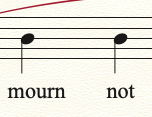
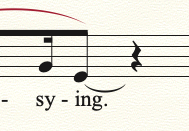
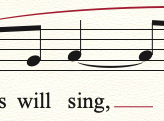
I'm looking for a setting that centers the word "would", for example; it appears too far to the right. I understand that the syllables are trying to avoid collision, but there are endless instances where syllables have plenty of room and are still off center:


There are tons of examples just within the 5 pages.

How should I justify the first syllable to make it center?

Thanks,

Acciones de comentarios Permalink
Avatar
0

 I have also found that music spacing can occasionally mess up the lyric alignment and justification.  What I often do after I've got everything else ready, is to back out so I can see the whole page, choose the lyrics tool, select the aling/move lyrics option, right click on one of the syllables, and then select "align default "and "justification default."

Acciones de comentarios Permalink
Avatar
0

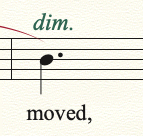
"-ing" and "sing" are left-aligned because of the tie.

"moved" is at the start of a measure.

You have cropped the top example so close one has no context, and the word-alignment depends (among other things) on context.

Acciones de comentarios Permalink
Avatar
0

Jonathon,


Do you leave auto-spacing on as you work on these?

Acciones de comentarios Permalink
Avatar
0

Yes, auto spacing is on.

Thomas - that actually worked for the word "would", but I had to right-click and change alignment/justification to center.

Should I even be concerned about justification, or this is merely an alignment issue?

If the beginning of the measure as well as proximity to ties are deal breakers, then I suppose I'll give up on those.

Acciones de comentarios Permalink
Avatar
0

I would strongly suggest turning auto-spacing off when doing these layout adjustments. There will be times when you make manual adjustments and auto-spacing will delete your fine tuning.

Acciones de comentarios Permalink
Avatar
0

"Thomas - that actually worked for the word "would", but I had to right-click and change alignment/justification to center.  Should I even be concerned about justification, or this is merely an alignment issue?"


Yes.  I routinely have to reapply my alignment settings after certain things, like music spacing applications, mess them up.


Actually, justification comes into play when you have several verses aligned above each other.  If it is just a single line of lyrics, which these seem to be, I would suspect that all you need worry about is the alignment issue.  My main point is that, if you apply a music spacing paradigm, check to make sure that a global realignment might help.


And, responding to Jeffrey Turner, turning off auto music spacing might help.  Apply when you need/want it.

Acciones de comentarios Permalink
Avatar
0

The author of common sense, Thomas Payne. Thanks y'all.

Acciones de comentarios Permalink
Avatar
0

wrote that a while back, but thanks; spelled my name differently, too.

Cheers.

Acciones de comentarios Permalink

Iniciar sesión para dejar un comentario.