Nueva publicación
Avatar
0

Hi.

I'm using latest version of Finale (26.2.2.493) on Mac OS Catalina.

I need to make audio-export of my scores for rehearsal-purposes.

I use Fusion Drum Kit for percussion.

The tambourine is much too loud compared to all the other sounds.

Is there a way to lower the sound of the the tambourine only??

Of course I could use two staffs and write the tambourine notes on its own staff and lower this staff in the mixer part, but that would be quite some extra work. In the end I need to create one-staff percussion sheets for the musician.

Thanks for any advice on this!

8 comentarios

Fecha Votos
Avatar
0

You must have adapted your Percussion map, since I cannot get the Fusion Drum Set to produce a Tambourine sound at all. Page 133 of the JABB 3 PDF manual says that MIDI #54, assigned to tambourine in GM kits produced a Ride Bell sound in Fusion Drum kits.


Perhaps your best bet is to create a non-playing staff for your drummer and then use hidden staves to produce the mock-up sounds you want.

Acciones de comentarios Permalink
Avatar
0

I have not changed much of FInale's default settings. In my setup, the tambourine i assigned to Midi #54 (F# below middle C"). I have use a percussion to specify in which staff positions I want the different percussion instruments placed, but that should not affect playback.

"Perhaps your best bet is to create a non-playing staff for your drummer and then use hidden staves to produce the mock-up sounds you want."
Yes! if there is now way to lower only the sound of the tambourine, that is what I might need to do...

Acciones de comentarios Permalink
Avatar
0

Okay, I found your tambourine. (Can't believe it is too loud, but that's up to you.)

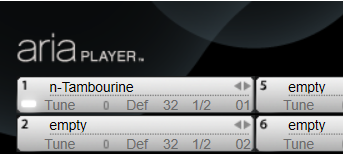
The key is to put the tambourine in a separate instance of the Aria Player, which you can tone down with the slider in the Banks and Effects panel.

Acciones de comentarios Permalink
Avatar
0

Can you describe a little more detailed how I can do this? Do I do it from inside Finale, or do I launch the Aria Player app? I haven't really worked with this before, and Google-search didn't really help me...


Acciones de comentarios Permalink
Avatar
0

Set up a second instance of Aria in the Banks & Effects panel (by pulling down the menu in VST slot #2).


Then click the pencil beside the Bank 2 Aria Player and manually assign the Tambourine to a slot in that player.


Then in Score Manager set the MIDI bank and channel to point to the added Tambourine.


If you use a Percussion map that matches the Tambourine slot on the original drum staff to a non-paying sound, you can use the original drum part for printing and then draw the Tambourine sounds from the hidden active one-line Tambourine staff.

Acciones de comentarios Permalink
Avatar
0

Besides having greater control over your VIs (virtual instruments), there's another advantage to using multiple instances of Players.


Unless it is designed to access multiple cores in a single instance (UVI and Kontakt are not), each instance of a player will access one core only. If you find your system overloading. you can create an instance for each instrument. This lets your OS balance the load among the number of cores you have. This happens under the hood—nothing else for you to. 


It's a DAW trick but applies here, too.

Acciones de comentarios Permalink
Avatar
0

Adrian: Thank you very much for the good instructions. I will test it shortly... :)

Mike: Great tip. I'm currently scoring just for a 10 piece orchestra on a quite faste macbook, so I have no problems whatsoever. But nice to know when I score for Symphony Orchestras.


Acciones de comentarios Permalink
Avatar
0

Some people put different sections (winds, strings, percussion, etc.) into different instances of Aria (or another VST) because it allows them to adjust reverb and other effects to handle volume and an impression of distance and spacial dispersion.

Acciones de comentarios Permalink

Iniciar sesión para dejar un comentario.