Nueva publicación
Avatar
0

Windows  10, FInale 26.x current

Hi all,

For some odd reason I cannot change the LEFT bar line of any measure.

I have done it before, but it is not functioning now.

Here are two screenshots. I want the dotted line between bars 97-98.
I've have tried all of the "Left bar line" options, and none of them showed.

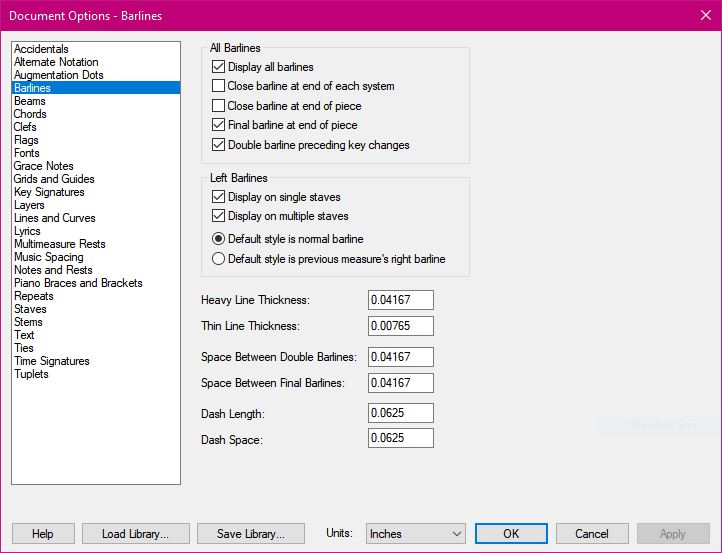
Here are my Document Options...  I tried checking and unchecking "Display on single staves"
 

Thank you,
:-)
Vanessa

6 comentarios

Fecha Votos
Avatar
0

Well, just poking around a bit, I now understand that "left barline" in Finale means only the first bar in the staff line.

So, unless I create a shaped Expression, I cannot not change the left barline of any measure; I can with the right barline for any measure, but not the left.

Perhaps this qualifies for a "feature request?"

Thank you, anyway.
:-)
Vanessa

Acciones de comentarios Permalink
Avatar
0

I'm not exactly sure what you are wanting. You seem to have come to the right conclusion about barlines, so I'm not sure what is preventing you from changing the circled barline in your screenshot.

Acciones de comentarios Permalink
Avatar
0

I also don't quite understand your problem. All you have to do is select bar 97, right-click > barlines > dashed, and you'll  have the barline you want between 97 and 98 (I only see "dashed", is there perhaps a different "dotted" barline in Fin26?)

Acciones de comentarios Permalink
Avatar
0

George and Michael,

You are absolutely right.

I will jokingly blame my misunderstanding on the smoke from our California wildfire that have permeated my brain.

I knew I had used the "Dashed" barline before. I think this time I saw the options for the "left" barline and got stuck on it.

Thank you both for waking me up ;-)
:-)
Vanessa

Acciones de comentarios Permalink
Avatar
0

Stay safe.

Acciones de comentarios Permalink
Avatar
0

Tanks
:-)
Vanessa

Acciones de comentarios Permalink

Iniciar sesión para dejar un comentario.