Nueva publicación
Avatar
0

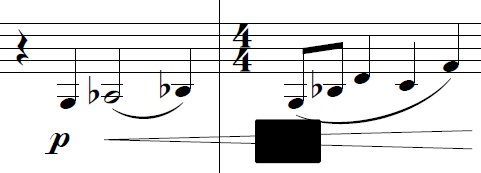
I'm having an issue where all expressions that have opaque backgrounds show up as solid black boxes after exporting as PDF.

They're in the exact same location and have the same dimensions/shape as the expressions. They show up properly while working in Finale. This happens whether I go through File>Export>PDF or Graphics Tool>Export Pages>PDF. Doesn't matter if "allow transparency" is checked or not.

Unchecking "opaque" for the individual expressions fixes it. Any border lines show properly, too.

I like using opaque expressions for items that need to go across bar lines without interrupting the text.

Finale version 26.1.0.397 running on Windows 10 Enterprise.

3 comentarios

Fecha Votos
Avatar
0

A number of issues. Sounds like you're not printing to Grey Scale — I don't believe that opaque works over Text or B&W (depends on the print driver what it is called).


Try Print to pdf and see if this changes. With Windows, there's no native pdf tool as with the Mac so this is one area where the two OS are different.


Likewise, you don't say what you're printing to — or is it just pdf? 

Acciones de comentarios Permalink
Avatar
0

Mike,


Thanks for chiming in. I'm using File>Export and the graphics tool to save directly to PDF. Not really printing, unless it's doing some kind of sneaky "print-to-file" behind the scenes.

Acciones de comentarios Permalink
Avatar
0

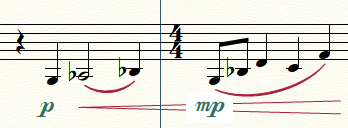
I am having the same issue. Here is a comparison between what I see in finale vs. what I see in the exported pdf. This problem seems to be exclusively for finale 26. Also, I went back in and adjusted the size of the enclosure shape, and that somehow fixed it.

Acciones de comentarios Permalink

Iniciar sesión para dejar un comentario.