Hi everyone,
For some reason, either my noteheads, stems or both seem to be seriously misshaped. Tried switching to engraver and jazz font and reinstalling the Maestro font - no luck. Any input will be hugely appreciated.
Thanks
Ira 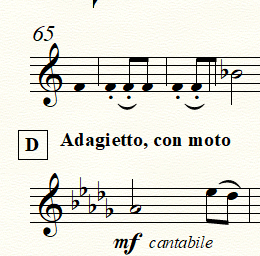


Either the fonts you need aren't installed or, more likely, Finale can't find them.
If Jeffery's suggestion doesn't fix you up, tell us what we need to know. This is one area where the OS, Finale build and whether or not you've had older versions installed each make a difference. Easily fixable but how all depends.
https://makemusic.zendesk.com/hc/en-us/community/posts/215729367-General-Discussion-House-Rules
Win 10 seems to be more subject to corrupted paths after an update. You can download and reinstall the MakeMusic Font Pack.
https://makemusic.zendesk.com/hc/en-us/articles/217585418-Music-fonts-display-incorrectly
You never mentioned if the original problem involved one of the default fonts or not. If a 3rd party font, then Finale needs to find the FAN file as well. The above download should reset the paths to MM's FANs as well.
This is if Finale is installed in the default location. It is, right? If not, reinstall Finale to where it belongs.
Iniciar sesión para dejar un comentario.
6 comentarios
Fecha Votos