Nueva publicación
Avatar
0

MacBook Pro Mojave 10.14.6  Finale version 26.3.1

When I put a clef in the middle of a measure, it ends up, sometime later, moving to the right end of the measure. If I move it back to where I want it, all of the notes fall back into place. Later, it moves again to the right side of the measure. How do I get these clefs in the middle of measures to stay where I put them?

16 comentarios

Fecha Votos
Avatar
0
Acciones de comentarios Permalink
Avatar
0

Are you "moving" the clef or are you highlighting the part of the measure you want to use the new clef and then adding the clef with the clef tool?

Acciones de comentarios Permalink
Avatar
0

Mike-

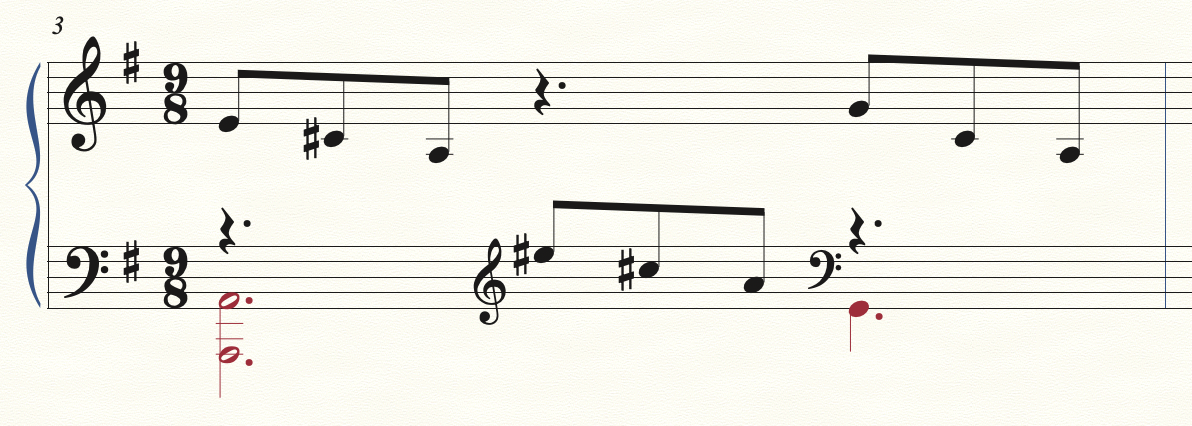
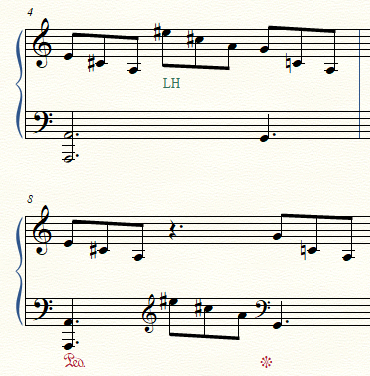
Thanks for the response. I have no problem putting the clef in, and initially it stays in place. It moves when I’m working on some other part of the document. I have no idea why.  I did some analysis this afternoon. The document I’m working on is a piece for harp written in 1924 by a very good harpist/composer named Marcel Tournier. It’s a complicated piece, and in the 3rd movement, he has lots of tuplets(groups of 4, 5, 6, or 7 notes) that are divided between the upper and lower staves.  I enter all of the notes of the tuplet in the upper staff, and then move several of the notes to the lower staff. I’m going to send you a couple of images. What I realized today is that all of the clefs that move(when I’m doing work elswhere in the document) are ones that are followed by tuplet notes. The clefs(in the middle of a measure) that are followed by notes that are not tuplets don’t move.
 
I have a Finale guru who has been fabulous at teaching me Finale(I’ve been doing it for about a month now), and is incredible at figuring out how to do very complicated things that I need. Even he is stumped on this one.  Let me send you a couple of photos to show you what happens.  This afternoon I was working on a measure at the end of the piece. I had corrected all of the clefs before starting to work. I was using the note moving tool so I could move notes left or right in a complicated measure. After doing that for maybe 7 minutes, I went back and checked the clefs. 7 of them had moved. 15 had not.  
 
One last comment. If I fix all of the clefs and then don’t do any work of any kind on the document, they don’t move (as far as I can tell). It’s only when I do something else elsewhere in the document that they move.


Acciones de comentarios Permalink
Avatar
0

Adrien- Thank you for the response. I’m highlighting the part of the measure and then adding the new clef with the clef tool.

Acciones de comentarios Permalink
Avatar
0

Mike- At the urging of my Finale guru, I recreated the preference file this afternoon.  So I don't know right now if that fixed the problem or not.  If you send me a private email, I can send you a couple of photos of what happens. It's really driving me nuts!

Acciones de comentarios Permalink
Avatar
0

Carl,
My email is in my signature.

Acciones de comentarios Permalink
Avatar
0

You can post images or screenshots here .

Acciones de comentarios Permalink
Avatar
0

I've been working with Carl on this issue and I believe that I've narrowed it down to a simple case shown below:

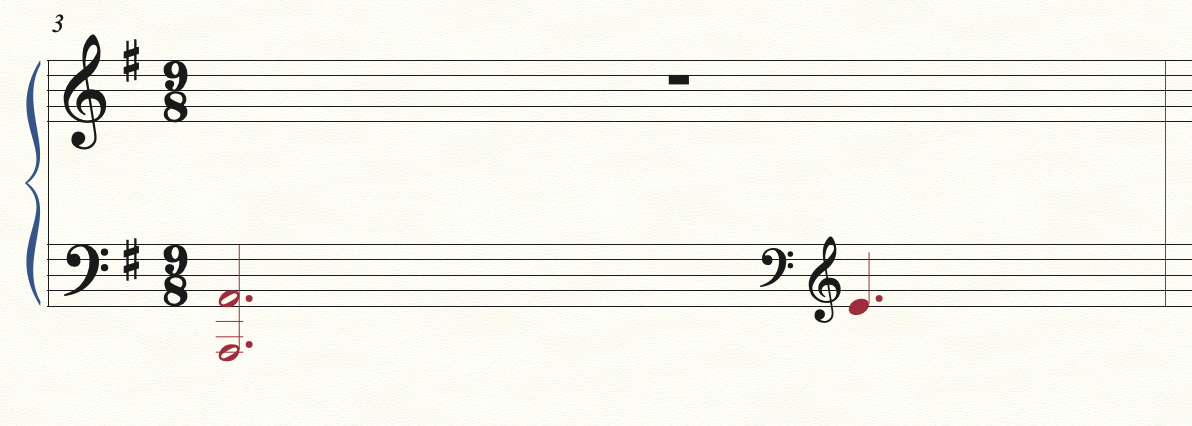
If you select Layer 2 for editing and then do a "Show Active Layer Only" the clefs move:

It seems like Finale will move the clefs when the notes on Layer 1 are not visible. This is not good because the piece Carl is working on has about 25 measures that have mid-measure clef changes and it's a pain to go back and have to fix them all. FYI, I have the "Manual Positioning: Incorporate" setting in Document Options - Music Spacing (although the "Ignore" setting does the same thing). Is there some setting so that manual positioning of the mid-measure clefs will be frozen?


Acciones de comentarios Permalink
Avatar
0

I can reproduce your situation. All I can do is suggest a couple of alternate approaches. I realize you may be transcribing someone else's music and not be able to change the way it is notated.

Acciones de comentarios Permalink
Avatar
0

Thanks for the confirmation that I'm not missing something obvious. This is a much simplified example. The actual measures in the piece are much more complex and often include cross-staff beaming and portions of tuples.

If no one else comes up with a work-around, we may do all the other editing and then go back at the very end and correct the clefs when there is (hopefully) no further need for "Show Active Layer Only".

Acciones de comentarios Permalink
Avatar
0

… we may do all the other editing and then go back at the very end and correct the clefs when there is (hopefully) no further need for "Show Active Layer Only" …


Instead of, at the very end correcting the clefs manually one-by-one, you may just have to Apply Music Spacing (assuming that you have no “manual” layout adjustments that would be ruined by Music Spacing).

No promises, but it could not hurt to try it.

Acciones de comentarios Permalink
Avatar
0

Just wondering, is automatic music spacing on or off?

Acciones de comentarios Permalink
Avatar
0

I know, when I confirmed the situation, I had automatic spacing on.

Acciones de comentarios Permalink
Avatar
0

Apply Music Spacing does not fix the problem after the clefs collide. This is probably because there are no longer any notes between the clefs for spacing.

Jeffrey -- Yes, automatic music spacing is on. I just tried it with automatic music spacing off and that prevented the clefs from moving. Yeah! I'll have to play with it that way for a while on the full score to see if that will work with the actual edits that need to be done (mostly beaming across barlines at this point). 

Acciones de comentarios Permalink
Avatar
0

FWIW, I always have automatic spacing turned off. I guess that's why I haven't seen this problem.

Acciones de comentarios Permalink
Avatar
0

For all the years I've used Finale, I've never been aware of that in the Preferences. I'll try working with it off for a while. Maybe I'll like that better. Thanks!

Acciones de comentarios Permalink

Iniciar sesión para dejar un comentario.