Nueva publicación
Avatar
0

For some reason, Finale always slows down the tempo on the last bar of a song (in the case of a song ending with a repeat section, on the last repetition of the last bar). Sometimes, I don't want this behavior--say, if a song is meant to fade out or end abruptly (like many pop songs today do). How do I disable the auto-ritardando on the last bar?

7 comentarios

Fecha Votos
Avatar
0

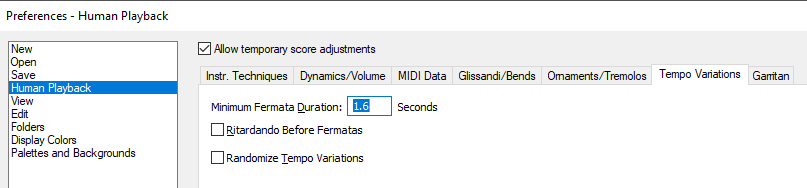
I’m away from the computer, but if I recall correctly, it’s in Human Playback preferences.

Acciones de comentarios Permalink
Avatar
0

Other MIDI tempo variations might be controlled via the Edit > Clear Selected Items > MIDI checkboxes.

Acciones de comentarios Permalink
Avatar
0

I've tried unchecking "Ritardo Before Fermatas", and it doesn't work. (Even when I clear select "Clear Selected Items" and opt to clear temp settings!) That is, it still does the ritardando.

Acciones de comentarios Permalink
Avatar
0

You may need to ask tech support. Use the Submit a Request tab at the top of the page.

Acciones de comentarios Permalink
Avatar
0

I just did. Thank you anyway.

Acciones de comentarios Permalink
Avatar
0

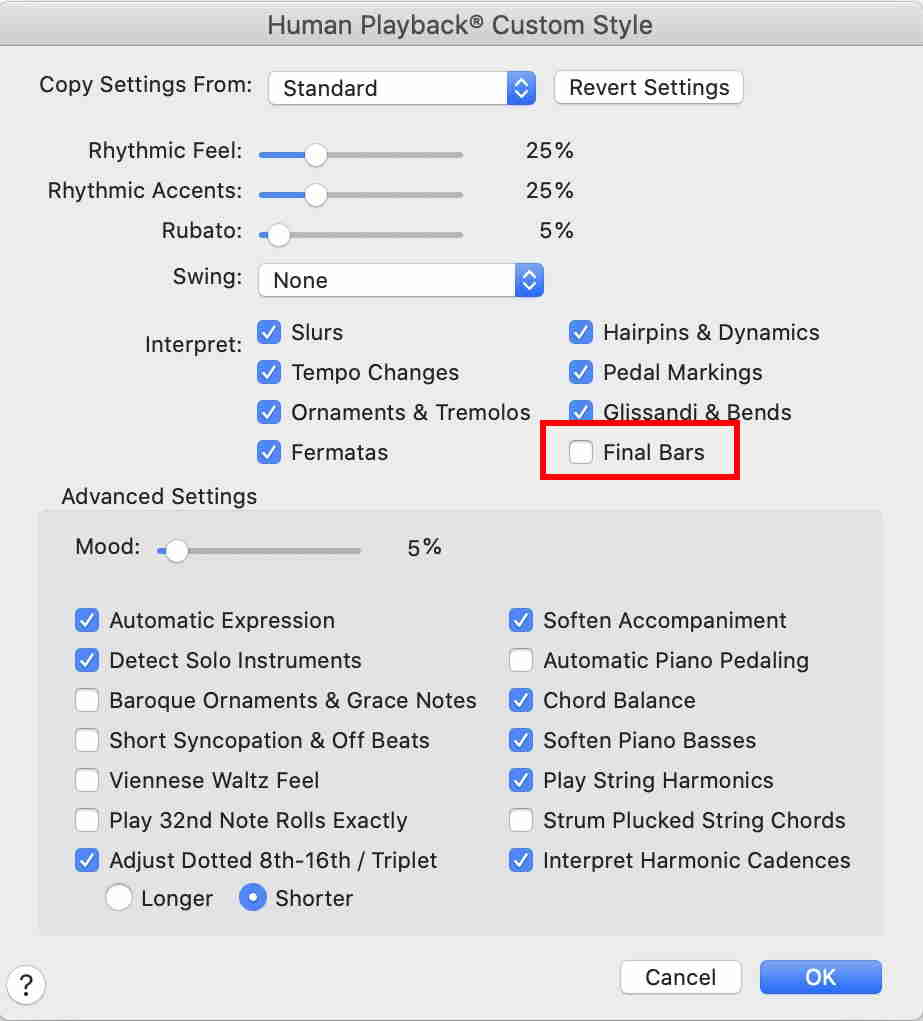
Just a wild guess:


Acciones de comentarios Permalink
Avatar
0

That seems to work. I just take a frequently used setting-set, say, (Copy From) "Rock", and uncheck (Interpret) "Final Bars". I had to make those adjustments for all "problem" documents, and saved them in my template files so that new songs will use them. Thank you!

Acciones de comentarios Permalink

Iniciar sesión para dejar un comentario.