Nueva publicación
Avatar
0

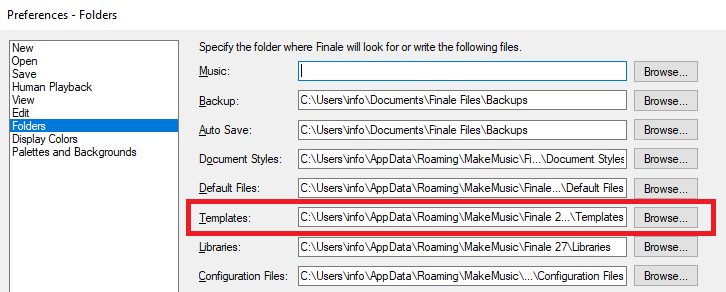
Am I missing something or is it always been that way? It has as far as I know and that is a very long history with Finale. When you create a new template file and save it, it never defaults to the Finale defined template folder. I have to navigate to that folder myself. Since we have to specify a unique folder for templates shouldn't Finale file them there automatically?

8 comentarios

Fecha Votos
Avatar
0

You would think you could access it directly from Program Options > Folders. But it doesn’t, so, when you get there the hard way, create a shortcut to that folder and put it on your desktop or somewhere accessible. I’ve done it for both templates and plugins.

Acciones de comentarios Permalink
Avatar
0

Mac or Windows? Probably makes a difference.


On my current iMac with 26, I had to navigate manually to Templates when saving and then give myself permission to write to that folder in a pop-up box. I only had to do this once and I don't remember if that was over Mojave or Catalina. Now they save as they should.

Acciones de comentarios Permalink
Avatar
0

Mike I have Windows 10. Finale does save musx files to the correct folder so it should save to templates to the template specified folder.

Acciones de comentarios Permalink
Avatar
0

Finale Windows likely saves templates where you tell it to.


Acciones de comentarios Permalink
Avatar
0

"Finale Windows likely saves templates where you tell it to."

Actually it doesn't. It saves everything in the Music folder you specify. At least none of my versions do unless I am missing something. The first three specified folders are th eonly ones that save where you tell them to. Plus the temp folder.

Acciones de comentarios Permalink
Avatar
0

It appears you are correct. When one chooses the template extension, Finale does not automatically select the template folder. This should be remedied as soon as possible.

Acciones de comentarios Permalink
Avatar
0

Agreed. But it probably won’t be, at least until the twelfth of never. Hence, my solution posted earlier. But even if it were, it would be a Windows-only fix, since Mac doesn’t use a special file type for templates. We just use a standard .musx, but it has to be placed in the templates folder.


The OP won’t use my shortcut idea, though, since I’m on his (bad word) list. But the rest of you can!

Acciones de comentarios Permalink
Avatar
0

" It appears you are correct."

Thanx for confirming that. I thought perhaps I was missing some easy explanation.

Acciones de comentarios Permalink

Iniciar sesión para dejar un comentario.