Nueva publicación
Avatar
0

I have carefully followed the steps described in the User Manual to change the swing feel to even in a short passage of a song.

It is said that you have to choose the Midi Tool, select the bars to change and in the Midi Tool Menu, right at the bottom, select "Apply Human Playback" and set the style in the following window.

Very simple.

But, it doesn't work.

I remember having made such changes in the past, with former versions of Finale.

Could someone tell me if there is something I have missed?

7 comentarios

Fecha Votos
Avatar
0

There is another way to do it:

Add an expression (Tempo Mark) that creates Swing playback (in the Default Document there is a ready made expression for Swing).

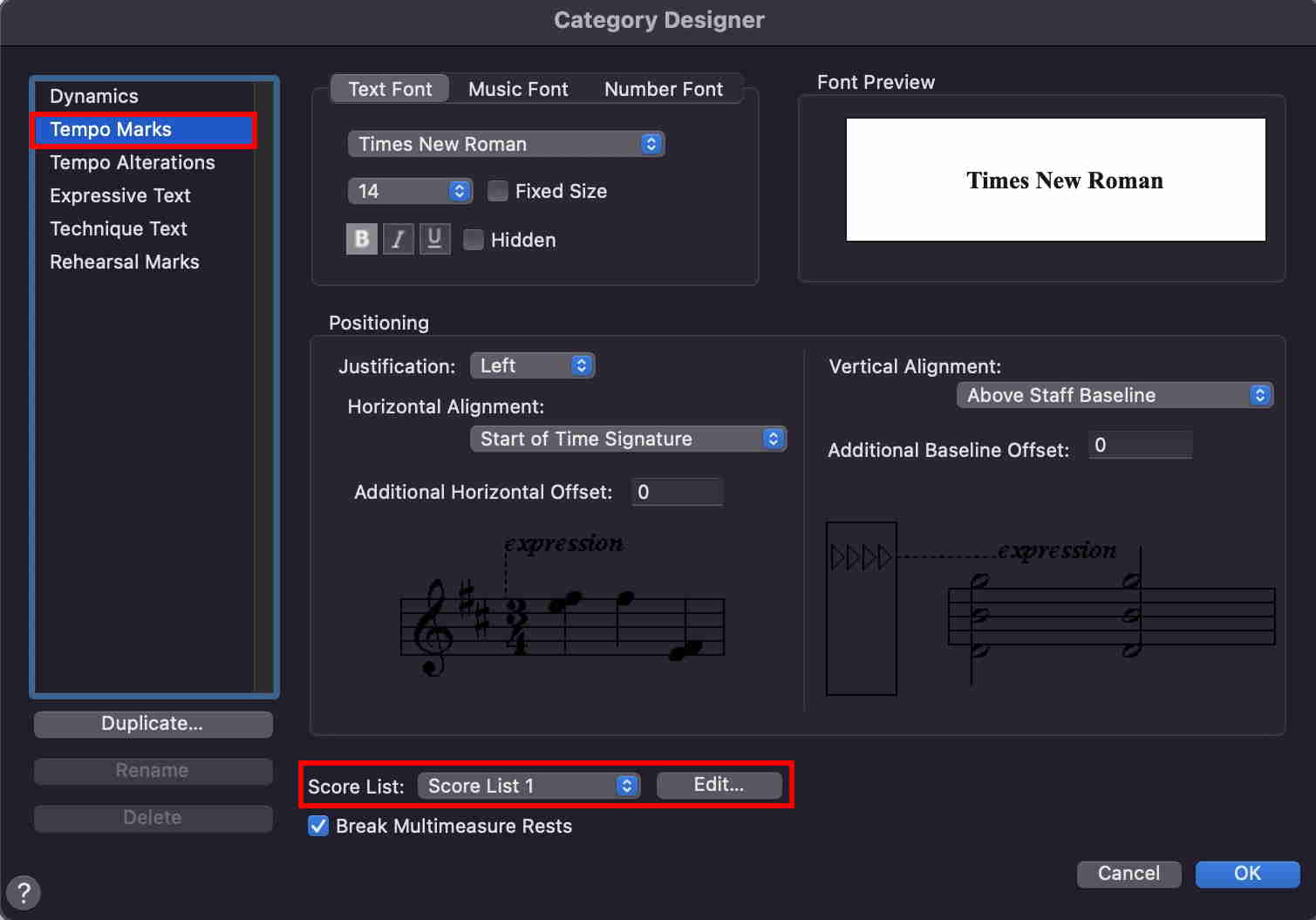
If your Finale document is a multi-staff document (= not a one-staff lead sheet), then take a good look at the Score List for the expression category Tempo Marks.

In the column for the linked parts, check all staves (assuming that you need Swing playback in all staves).

Yes, I know it sounds crazy that a setting for the Linked Parts would affect playback in the Score, but that is Just One Of Those Things.


At the end of the passage you will have to add another Tempo Mark expression, to cancel the Swing playback.

Acciones de comentarios Permalink
Avatar
0

Hi,

I knew this trick, which is as far as I remember, the old way to change the tempo or style.

I fact, I would like Makemusic to check this problem and fix it.

Acciones de comentarios Permalink
Avatar
0

where do I find "score list" for the expression category Tempo Marks?

Acciones de comentarios Permalink
Avatar
0

… where do I find "score list" for the expression category Tempo Marks? …


Assuming that you are using Finale v27:

Document menu > Category Designer…

In the category column (= in the left side), click on the Tempo Marks category, to select it.

Now you should see, at the bottom of the Category Designer, a pop up menu called Score List.

By default, Score List 1 is selected in the pop up menu.

To edit the selected Score List, click the button {Edit…}.

Acciones de comentarios Permalink
Avatar
0

At the bottom of my Category Designer is "Miscellaneous." I can't find Score List. BTW I'm using 27.3 thanks

Acciones de comentarios Permalink
Avatar
0

… At the bottom of my Category Designer is "Miscellaneous." I can't find Score List. BTW I'm using 27.3 …


Perhaps you did not select the Tempo Marks category?

You will not see a Score List if the Miscellaneous category is selected.


Acciones de comentarios Permalink
Avatar
0

Got it, thanks so much!

Acciones de comentarios Permalink

Iniciar sesión para dejar un comentario.