Nueva publicación
Avatar
0

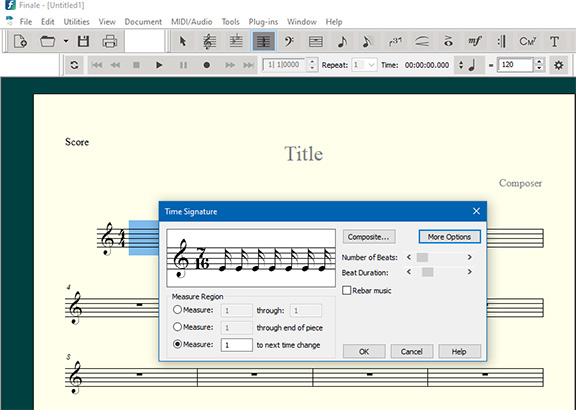
Hi, I'm using Windows 10 and Finale v27 and would like to know how to change my current 7/8 time signature to 7/16 please.

Whenever I try to use the sliders I get 6/16 or 9/16 but it never shows 7/16

Thanks

Richard Raizis

5 comentarios

Fecha Votos
Avatar
0

Not enough info.


The 7/16 time signature’s default beaming depends on how the time signature is defined.

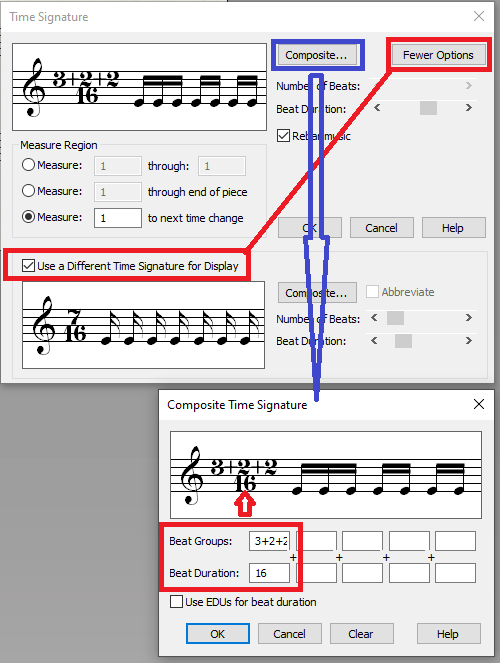
A few examples:


What default beaming do you need for the 7/16 time signature?

Acciones de comentarios Permalink
Avatar
0

Richard,


You need to use the Composite section of the time signature tool to set the grouping of sixteenths and then use the More Options button to simplify the displayed time signature as 7/16.


Acciones de comentarios Permalink
Avatar
0

 I try to use the sliders I get 6/16 or 9/16 but it never shows 7/16


Are you after certain beaming patterns or just using 7/16 time sig? If you just want the 7/16 time sig, you just haven't moved  the sliders correctly yet. It is there.

Acciones de comentarios Permalink
Avatar
0

If, in the window that Ernest is showing the sixteenths, you have dotted eighth notes, that would explain the jumps from 6 to 9. Move the “beat duration” slider to 16ths.

But you have to set up the beaming yourself.

Acciones de comentarios Permalink
Avatar
0

Hey thanks guys, I've carried out your suggestions with 2+2+3 / 16 etc and it works perfectly. Now displays 7/16.

Much appreciated!


Acciones de comentarios Permalink

Iniciar sesión para dejar un comentario.