New post
Avatar
0

This problem has been intermittent for me since 2012, got worse in 2014, and now seems nearly constant in 2014.5:

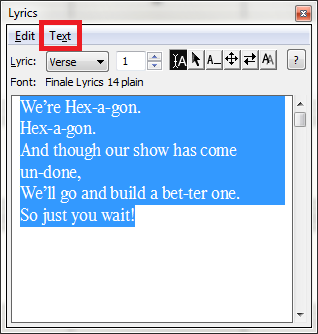
To format (font, size) lyric text, I have to select it, but most of the time text only stays "selected" until I try to go to the drop-down menu to do something (e.g., Text ⪼ Font ⪼ Helvetica, or Text ⪼ Size ⪼ Fixed)—the moment I leave the lyric window, (sometimes it stays until I click "Text" in the menu bar) the text selection disappears so the only thing I can do is format the "beginning" of the field and retype everything, which means reassigning it all in the music if I've already done that. Occasionally, save/quit/restart causes it to work OK once or twice, but that gets old in a hurry as well.

Suggestions please?

8 comments

Date Votes
Avatar
0

Could you explain what type of reformatting you are doing? I find it easiest to enter my lyrics in another program (Pages, in my case.) Then I run them through Jucio Brennan's Lyric Hyphenator online utility. Next, I paste them back into Pages, for proofreading. This is when I would make any font or size changes. 

Finally, I paste them into the Finale Lyric window, and use click-assign to enter them.

It sounds kind of complicated, but it's actually pretty fast and easy.

Finale's font handling has always been kind of wonky. They keep promising inprovements...

Comment actions Permalink
Avatar
0

I copy my lyrics into the Lyric Edit window directly from  Jucio Brennan's Lyric Hyphenator and format it in the Lyric Edit window with no problem; so if the Horstmans are having difficulty with this, their experience is not typical. Am I correct in assuming the OP is using the Text menu in the lyric window itself and not the one in the main Finale menu at the top of the screen?


(Mike, its good to see you on this forum. In addition to knowing things about Finale that I don't, your specific experience with PrintMusic will help a number of questioners where I cannot.)


Comment actions Permalink
Avatar
0

Don't expect to see me a lot. I'm really disappointed with the lack of features in this forum, and truly pissed at MM for their high handed treatment of all of us at the original forum. 


I'll come here when I'm bored, but that will be about all.

Comment actions Permalink
Avatar
0

I usually copy lyrics (e.g., scripture passages) into Word, hyphenate (they're usually short passages), and paste into the Lyric window. But when I'm composing, I sometimes need to reword things to fit a rhythm, or change fonts/sizes to get things to fit properly on the page without collisions. My wife also just had cataract surgery and suddenly prefers sans-serif fonts, so I've been going back through old material and updating. Even changing one word is frustrating because I can't get to the keyboard fast enough after highlighting the "old" word—selection changes to blinking cursor at the start of the word, so I have to type the new word in ahead of the old, then delete the old. That's just an annoyance because I can actually accomplish the task, but not being able to change font/size is a real hindrance.

@JAV: Strange, my Lyric window doesn't look like yours (Win v. Mac?)(Ironically, when I went back to Finale to get this screen shot, text selection held rock solid 😕)

I can only set font attributes from the Text drop-down on the main Finale toolbar.

As I said, this started in Finale 2012, got worse in 2014, and now nearly constant in 2014.5

Thanks for the feedback!—mgh

Comment actions Permalink
Avatar
0

Yes, the lyrics window appearance difference is Windows/Mac.

To avoid the occasional lyric collision, I use the beat chart and respace manually. If it's a hyphenation change, I'll do it in the score. (Make sure that Type into Score is selected.)


Comment actions Permalink
Avatar
0

Mike,

Send me an email at wawoodman at aol dot com. I'll send you my phone number, and maybe I can talk you through some of the problems.

Comment actions Permalink
Avatar
0

@Mike: Thanks for your generous offer—I may take you up on that a bit later, but right now is especially busy for us church musicians and I don't know when I'll be back into Finale after last night's frustration… (one service done this AM, one more to prep for tonight…)

I also respace (both notes and lyrics) manually—I play guitar and try very hard to minimize the number of page turns and so "compress" scores to fit the minimum number of pages without actually reducing  note/text size any more than needed. My changes tend not to be in hyphenation, but in fonts and sizes. I also do song sheets for the congregation and try to keep the text at a consistent font/size throughout; therefore, I need "fixed" font size in case I have to change the size of the rest of the score to save space for a specific sheet.

Thanks again so very much for the help!

mgh


Comment actions Permalink
Avatar
0

I also use the Alignment and Justification options in the Lyrics menu (or right-click context menu) to adjust spacing issues in tight lyric deployment.

Comment actions Permalink

Please sign in to leave a comment.