New post
Avatar
0

Hi, First of all I so MISS the ease of being able to search the old forum, certain this answer is in there somewhere.    Also, my preference on public forums is to use a pseudonym, there is no longer that option here and no way to reach out to past forum posters who I know have good advise.

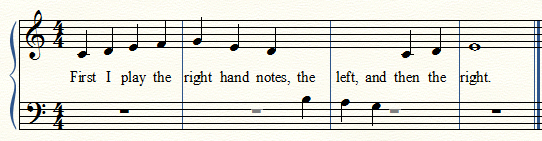
Problem:  I am creating some easy five finger piano -- middle C position-- pieces where the melody weaves between the left and right hand.    I can't get the lyrics to stay in between the staves, the ones clicked to the bass clef notes are drifting down below that staff.   Is there a fix or do I have to create two separate lyrics breaking things up as to the words that go with one staff and vice versa.

Finale 25, Windows 10, Lots of toys.


9 comments

Date Votes
Avatar
0

Have you thought of using cross-staff notes (the TG plug-in). You'd have to flip the LH stems, but it keeps the lyrics together.


(Of course "searching" was never the strength of the Old Forum, but there is a sticky post on a work-around for searching.)

Comment actions Permalink
Avatar
0

Is it possible to keep the correct rests while doing this, it seems awkward to notate it wrong just so the words are right?


Comment actions Permalink
Avatar
0

Perhaps it is simpler to -

1) Enter the “lyrics rhythm” in Layer 4.

2) Attach the lyrics to Layer 4.

3) Hide Layer 4 (use Blank Notation in Layer 4).

If playback is important, disable playback of Layer 4 (in Document Options - Layers).

Comment actions Permalink
Avatar
0

I've done the blank notation in another layer before, and it does work, although again it is awkward.   What is a little easier, is to designate the lyrics that go with bass clef notes as Verse 2 then adjust the baseline of that verse to be between the staves.   With beginning piano projects this isn't too bad, but it does eliminate the function of being able to easily edit the words in the lyric text box.  I just think that in piano notation, melodies with words that swing between one staff and the other are pretty common and Finale should have a way to do this. 

Comment actions Permalink
Avatar
0

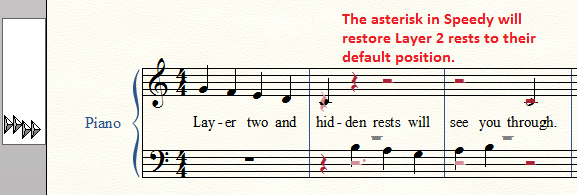
In addition to the solutions above, you can add rests in layer 2 (if that is what you meant) and use the asterisk key to reposition those visible and the H or O (oh) key to hide those you do not wish to see.


Comment actions Permalink
Avatar
0

As a singer for over 50 years, I cannot ever recall seeing a situation where the notes went from one staff to another for a single voice. That's what ledger lines are for.

Comment actions Permalink
Avatar
0

If one were using a song to teach beginning piano, Deborah's solution might be inspired even if the method is unusual.

Comment actions Permalink
Avatar
0

Mike, absolutely, I am not creating voice music.   This is five finger middle c position piano music.  Bass clef F to treble G.    Little kids respond better to the pieces if they have words.  My current project is arranging some pop tunes (well known, words won't be sung, but for kids to play well they need the words in their head) for five finger piano with teacher accompaniment.   I'm not married to my "unusual" method -in fact I would love to have an easier way, however,  -- I opt, whether in Finale or Word or Excel or Quick Books or any of the other software I use to do whatever has the fewest steps.   For complex work, I think the most precise approach here is the layer approach, with hidden notes in the same rhythm as the bass clef melodies being hidden.  If anyone can come up with a quicker way.... I'm all ears..... or fingers.....  


Comment actions Permalink
Avatar
0

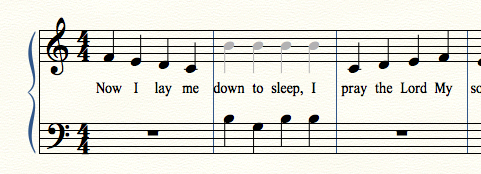
In that case, put all your notes in the treble staff. Attach the lyrics. Hide the notes you don't want to show, and enter them in the bass clef. Put rests in another layer, and hide them as needed. (I didn't show any, here.)

Comment actions Permalink

Please sign in to leave a comment.