New post
Avatar
0

I'm using Finale 2011 on Mac, System 10.9.5

For compound time signatures (7/8 + 3/16) for example, the + sign

is located far below the numbers rather than between them.

This is the commonly used sign which appears in the settings box.

How can I change the position?

many thanks,

David Nichol

10 comments

Date Votes
Avatar
0

Take a look in

Document Options - Time Signatures

What is the Vertical Adjustment for Abbreviated Symbol?

Comment actions Permalink
Avatar
0

Thanks Peter,

My settings are Top number 230 Bottom number 162

I'm using Maestro 30pt time signatures to appear in the score on the top staff and over the Strings.

Whatever settings I use for top and bottom, the + sign remains on the middle line of the staff.

Any ideas?

David

Comment actions Permalink
Avatar
0

I guess that means Finale 2011 does not support large time signatures (at least not two added together).

Comment actions Permalink
Avatar
0

Thanks for your post Mr. Verkouteren.

Do you know if later versions are capable of moving the + sign?

David

Comment actions Permalink
Avatar
0

David Nichol,


You wrote:

“My settings are Top number 230 Bottom number 162”


I suppose that those settings are the Vertical Adjustment for Top Symbol and Bottom Symbol, right?

(By The Way: What are the Measurement Units? Look at the bottom of the dialog box Document Options - Time Signatures)


Above the field for Top Symbol you have the setting for Vertical Adjustment of Abbreviated Symbol.

What is the Vertical Adjustment for Abbreviated Symbol?

Comment actions Permalink
Avatar
0

Yes, you are correct.

The measurement units are EVPU's

The Vertical Adjustment for the Abbreviated Symbol is zero 

but I am not using that

Comment actions Permalink
Avatar
1

David Nichol,

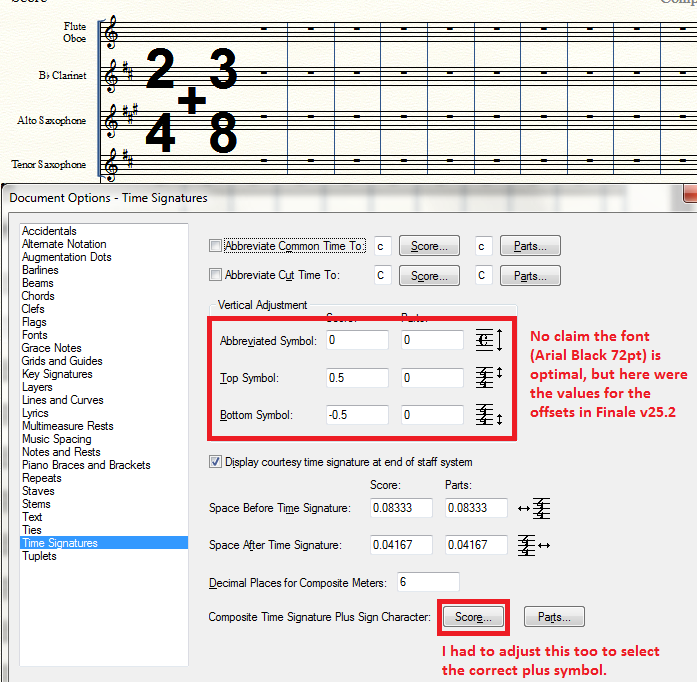
The large composite time sigs are possible in Finale 25.2. (If I actually used them, I'd definitely search for a better looking font than what I chose for the demo/proof-of-concept illustration.) Finale's help file for Time Signatures (v 25) has instructions what to change, although I suspect pre-25 versions can accomplish the same thing with a few more steps.


My measurements are set in inches.


Comment actions Permalink
Avatar
0

David Nichol,


You wrote:

“The Vertical Adjustment for the Abbreviated Symbol is zero 

but I am not using that”


What happens if you change the Vertical Adjustment for the Abbreviated Symbol?

Does that change move the + sign vertically up/down?

Comment actions Permalink
Avatar
0

Gentlemen,

Thanks for your kind attention to my problem. You have spent some time thinking about it

and trying to help. I am grateful. I have decided to construct the compound time signature

in Shape Editor to give me the control over the + sign I want. Later perhaps I will buy

a newer version of the programme.

Thanks again,

David

Comment actions Permalink
Avatar
0

A lot has to do with the font and size of the plus sign. One then uses the Abbreviated Symbol setting (if available)  to center it vertically between the numerator and denominator of the time signatures.

Comment actions Permalink

Please sign in to leave a comment.