New post
Avatar
0

Hello everyone, 

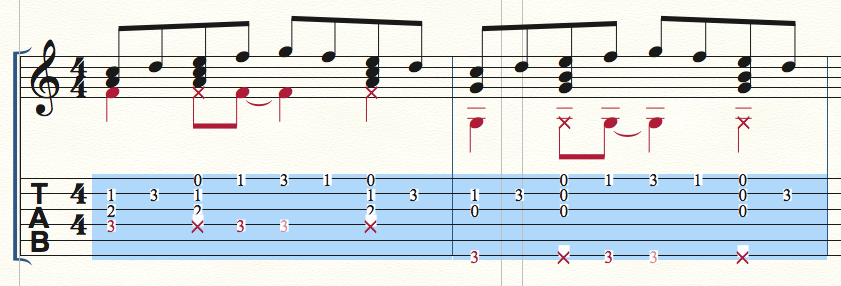
I have just upgraded my Finale to the Finale v25 in my MacBook Pro OS X El Capitan. When I want to include percussion sound into my arrangement, using the X-notehead, some of the fret numbers were covered by the "X" signs. This happens when the "X" sign and the fret number were at adjacent strings. When I select the Tablature region, the fret numbers and the signs have a "white area" around them, which I think is the main reason it cover up the number. I have gone through all the Settings that I know but it still didn't work. Please help... 

4 comments

Date Votes
Avatar
1

I can see that if your percussion is in the same layer as your notes.


Try importing your percussion into a separate layer. This way, you can drag only the notes into TAB.

Comment actions Permalink
Avatar
0

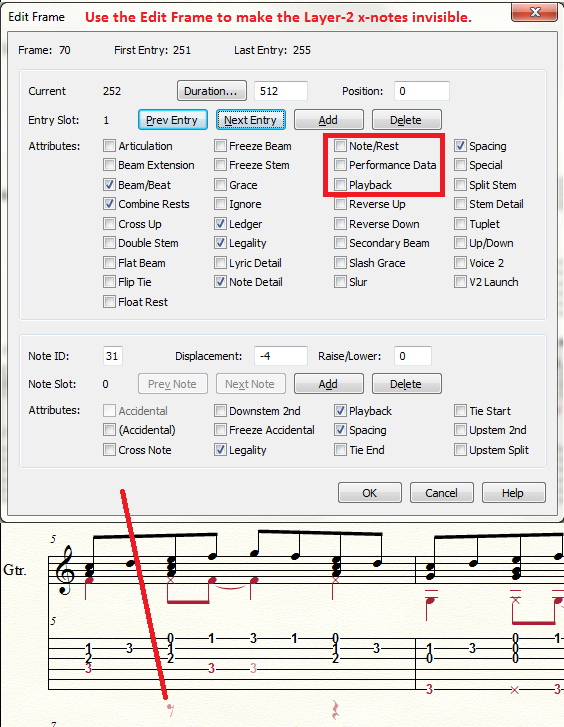
Try using the Edit Frame on the TAB staff to turn the x-notes into invisible rests. (I assume you want to keep the regular noteheads visible.)

To access the Edit Frame:

  1. Make sure you are in Layer 2.
  2. Choose the Speedy Entry Tool
  3. Click on a blank part of the page so that no measure is highlighted with the Speedy selection box.
  4. The CTRL-Click (I imagine that is CMD-Click on a Mac) on the TAB measure you want to edit.
  5. Use the NEXT button in the Edit Frame to find the appropriate Layer-2 entry and deselect the Playback and Note/Rest boxes.
  6. Click NEXT enough times to find the next x-note. (I keep an eye on the Duration box to compare the lengths of the notes to confirm I am on the right entry.)
  7. Click OK and move on to the next measure affected.

https://usermanuals.finalemusic.com/FinaleWin/Content/Finale/SPFRMDLG.htm?Highlight=%22Edit%20Frame%22 

Comment actions Permalink
Avatar
0

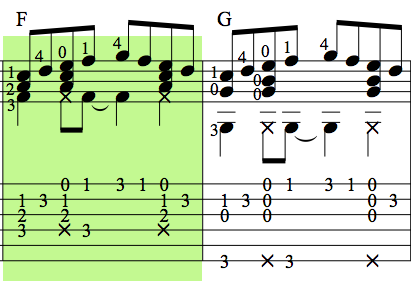
Thank you for your comments, but sorry to say that there must be a better way. Here I attach the same notation done by Finale 2010 (OS X 10.6.8 Snow Leopard).

The hightlighted area does not have the "White Area" which will cover up the fret number. I am doing the notation for guitar arrangement, which may have a lot of percussion sounds along the way with the normal sounding notes. Which means it will not be practical to put the "X"-notehead (percussion) to another layer, nor make it invisible, because we want to hear that hitting sound. 

I have a high expectation for this new version of Finale, hope there is a better solution for this. I really do not wish to switch to another notation software because of this problem. Please advise. Thanks.    


Comment actions Permalink
Avatar
0

Chiang Ken Phang,


It looks like you have found a bug.

I suggest that you open a ticket with the folks in MakeMusic’s Tech Support.

In your support ticket you can attach both the Finale 2010 document and the Finale v25 document.

Comment actions Permalink

Please sign in to leave a comment.