New post
Avatar
0

 I'm running Finale 25.2.0.79 for Mac and I'm just getting familiar with the ins and outs of the chord diagram editor. What I keep stumbling on is when I select a different diagram than the default option--let's say picking a C chord at the third fret rather than the open position--I pick the desired version and click okay. But instead of replacing the default symbol in my document it places the new selection ABOVE the default symbol. How do I make sure it replaces the default diagram?

6 comments

Date Votes
Avatar
0

Don Clark,


I could be wrong here, but instead of picking the desired fretboard diagram I think that you should edit the default fretboard diagram.

When you are in the Chord Tool, context-click the chord handle.

In the context menu, choose “Edit Fretboard…”.

Comment actions Permalink
Avatar
0

I've tried this, clicking on the Edit Fretboard command, finding the kind of desired chord I want, and clicking Generate, and then okay. But the chord symbol in my document did not change

Comment actions Permalink
Avatar
0

You wrote:

“clicking on the Edit Fretboard command, finding the kind of desired chord I want …”.


What do you mean by your words “… finding the kind of desired chord I want …” ?

Please explain your step(s).


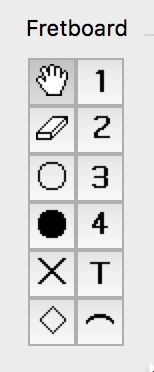
What works for me, is editing the fretboard diagram, using the (sub-)tool palette displayed in the left side of the Fretboard Editor.


Comment actions Permalink
Avatar
0

Thanks for helping me with this problem. What I'm trying to do is substitute, for the purposes of this example, the basic open position C chord with another one--say the barred "A" form positioned at the third fret. I've tried to do this two ways:

1) I double click on a note in a document to invoke the Chord Definition tool. When it comes up, I click on the Select button in the middle of the screen. After I do that I see a screen with some other chord diagrams. I click on the one I want, click okay. Go back to the Chord Definition screen and click okay. Then the new diagram is pasted onto my document above the original open C diagram, which is not replaced with the new one but remains. In some cases I've ended up with two readable diagrams--one above the other--or most recently the new one is pasted partly over the original chord, making both diagrams unreadable.

2) Or, I start the same way, and once I get the Chord Definition tool, I click instead on the Create button. When that opens up I again see some diagrams, I select the one I want. Hit okay, hit okay again when I get back to the Chord Definition tool, and once again it pastes an extra diagram rather than replacing the one I started with.


Comment actions Permalink
Avatar
0

That is the way Finale works (and the way other users expect Finale to work):

Your steps will add an extra fretboard diagram without affecting the original diagram already present in your layout.


I suggest that you first remove the original diagram from your layout (= select the diagram’s handle, and hit delete).

Then, add the new diagram.

Comment actions Permalink
Avatar
0

There you go. Thanks much. I knew it was something really obvious I wasn't thinking of

Comment actions Permalink

Please sign in to leave a comment.