New post
Avatar
0

The Help manual does not match the menu:

Menu:
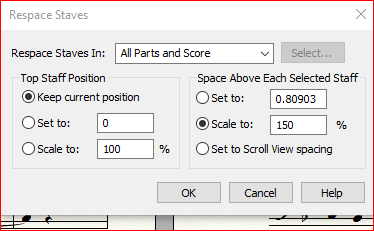


Help Manual:

-----------------------------------------------------------------------------------------------------------------------------------------------------------------------------------------------------------------------

To maintain a fixed distance between the remaining staves, select Distance Between Staves: Set to and enter the distance into the Set to text box.

The units are whatever you've selected under Edit > Measurement Units

-----------------------------------------------------------------------------------------------------------------------------------------------------------------------------------------------------------------------


i.e Where does it say " Distance Between Staves: Set to " in the Menu ??

4 comments

Date Votes
Avatar
0

In my own copy of Finale v25 I do not have something called a “Help Manual”.

Where did you find that “Help Manual”?


I do have an online manual called “User Manual”, but the description in my User Manual is a perfect match to the Respace Staves dialog box.

I suspect that you somehow are accessing a manual for an older Finale version.

Comment actions Permalink
Avatar
0

I am using the online user manual.

From within Finale v25 I clicked the Help -> Manual button
to the following web page:
https://usermanuals.finalemusic.com/FinaleWin/Content/Contents.htm?cshid=9501

Then I used the search function to the following page:
https://usermanuals.finalemusic.com/FinaleWin/Content/Finale/Staves.htm?Highlight=stave%20spacing

Scroll down to "Moving and evenly spacing staves"

Scroll down further to "To Space Existing Staves Evenly"

Scroll to No. 4 "Choose the appropriate options"

Scroll to the 5th and 6th options.

You will see help-text that does not match the actual menu in Finale (shown at the top of this thread).

Comment actions Permalink
Avatar
0

I see.


It looks like you have found a section that has not been updated to the current Finale version.


Try this:


Go to the manual page you found:

https://usermanuals.finalemusic.com/FinaleWin/Content/Finale/Staves.htm?Highlight=stave%20spacing 


Go to

3. Choose Staff > Respace Staves. The Respace Staves dialog box appears.


Click the hyperlink Respace Staves dialog box.


You will get to a page where the manual describes the Respace Staves dialog box correctly.

This is the page I was talking about, when I wrote:

“I do have an online manual called “User Manual”, but the description in my User Manual is a perfect match to the Respace Staves dialog box.”

Comment actions Permalink
Avatar
0

Thank you, I have resolved the spacing problem.

(You have Windows links mixed with Mac links in the previous post. 1st link is Windows 2nd two links are Mac)

Comment actions Permalink

Please sign in to leave a comment.