New post
Avatar
0

Win10, Finale 2014.


I'm trying to do a strange key signature with F#, C#, G#, D#, and Bb but playback is ignoring the key signature entirely, including the sharps. I can't figure out why, though. I plan to have many Bb's to emphasize this oddity, so putting it into the key signature is what will be easiest. If it just can't happen, I'll deal with each B individually, but I'm not sure why Finale is doing this.

Thanks!

10 comments

Date Votes
Avatar
0

I am unable to reproduce your problem.

For me the key signature plays back correctly - with F#, C#, G#, D# and Bb.


However, your key signature is really strange.

I suspect that many performers may play wrong pitches because of the (unusual) key signature.

Probably it is “safer” to notate the key signature with 4 sharps (= F#, C#, G#, D#), and then notate the Bb’s with note accidentals.

Comment actions Permalink
Avatar
0

What's the advantage to using B-flats instead of the usual A-sharps we've all been trained to expect and read proficiently? I wouldn't want to have to read B-flats in the midst of other notes filled with sharps. Next question: why have a key signature at all if normal key relationships don't apply? Just wondering...

Comment actions Permalink
Avatar
0

Windows 7, Finale 26.1

Hi Peter,

I read you old post on the old forum (https://forum.makemusic.com/default.aspx?f=5&m=169182) and found it, and the comment by Michael Cook at the very end very helpful.

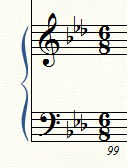
With your tips, I made this:

I use it for harp, to coordinate with the pedal diagram for instituting glissandi.

My question is, how can I move the Db over to the right so the three flats look more balanced?

Thank you,

:-)
Vanessa

Comment actions Permalink
Avatar
0

>What's the advantage to using B-flats instead of the usual A-sharps we've all been trained to expect and read proficiently? I wouldn't want to have to read B-flats in the midst of other notes filled with sharps. Next question: why have a key signature at all if normal key relationships don't apply? Just wondering...<


You aren't the only one. Sounds like the correct key is really B and some of the A# notes need to be naturalized or it's the key of E with accidentals  for the A. If a Bb was written as a leading tone to a B, there'd be protests from anyone I know possessing a good enough ear to know the difference—and the strings would be playing A# anyway.

Comment actions Permalink
Avatar
0

… how can I move the Db over to the right so the three flats look more balanced? …


The quick-and-dirty solution:

Increase the general space between key signature accidentals. Try e. g. 6e.


However, this solution also increases the space between the first two accidentals (that is why I call the solution quick-and-dirty).


If this solution is not good enough for you, then you will have to create the layout “manually”:

Hide the key signature and the time signature, and add extra space at the beginning of the measure, to make room for false key and time signatures (Measure Tool, double-click the measure).

Then, use the Expression Tool to add a false key signature, and a false time signature.

Comment actions Permalink
Avatar
0

Thank you, Peter

I will give it a try.

In the meanwhile, have you had success in accurate playback with a non-standard key signature?

In the piece referenced above, the key signature is simply an embellished Bb major by adding the Db.
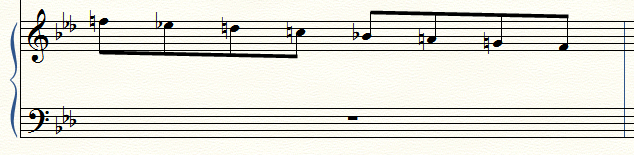
I had hoped the notes I enter would correspond to the key signature, but the Ds are still D-natural.

Perhaps I am doing something incorrectly?

Thank you,
:-)
Vanessa


Comment actions Permalink
Avatar
0

… In the meanwhile, have you had success in accurate playback with a non-standard key signature? …


For me, your key signature with 3 flats - as B♭, E♭, and D♭ - plays back correctly.


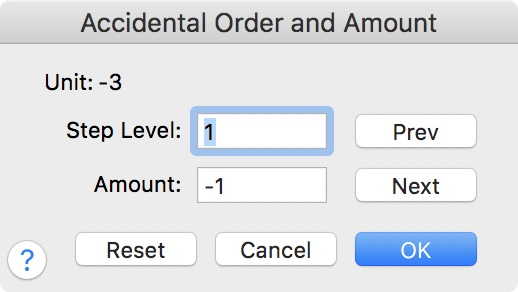
I created the Nonstandard key signature as a Linear Key Format 2 (*) - with 3 flats.

Then, changed the third flat from A♭ to D♭.


(*) The first two Linear Key Formats - Linear Key Format 0 and Linear Key Format 1 - are “hardwired” as major and minor.

Hence I had to go to Linear Key Format 2.

Comment actions Permalink
Avatar
0

Thank you, Peter,

That works!

However, the Db is down low, and not as in my previous example.
When I followed your example, the key signature is:

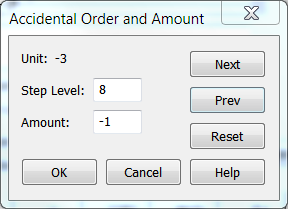
When I modified your example by moving the "Step Level" to 8, to place the Db is high, it doesn't:


Obviously, I do not understand all of the this, so I went with your example for functionality.
In the treble clef, it looks ok and readily can be seen, but in the bass clef the Db looks dangling, and as a mistake.

Is there a way to place the Db up next to the Eb, and still have the correct playback?

Thank you!!
:-)
Vanessa

Comment actions Permalink
Avatar
0

… When I modified your example by moving the "Step Level" to 8, to place the Db is high, it doesn't …


Vanessa,


No, no, set the Step Level to 1.

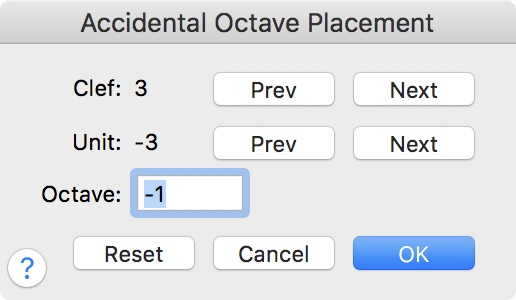
To position the accidental in a higher octave, use the dialog box Accidental Octave Placement.


You will have to specify the octave for each and every clef (in your case only Treble Clef and Bass Clef, - right?).

Treble Clef is Clef 0.

Bass Clef is Clef 3.

Comment actions Permalink
Avatar
0

Yes!!

Thank you, yet, again, Peter

That was the key (pun intended :-)

And thank you for specifying Treble Clef is Clef 0 and Bass Clef is Clef 3.

:-)
Vanessa

Comment actions Permalink

Please sign in to leave a comment.