New post
Avatar
0

Windows 10 and Finale 25.5

 I have a score in which the woodwinds are grouped and there is a subgroup for the three clarinet parts. I have suddenly found that the 1st Clarinet has the wrong key signature but the right notes on the staff. When I try to correct this the notes are transposed and the other parts are affected. How do I correct the key signature without causing any other changes in the score?

2 comments

Date Votes
Avatar
0

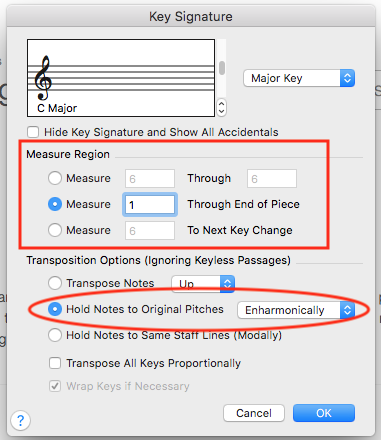
I suspect that you are changing the key directly from the Key Signature dropdown. Instead, select Edit Key Signature... In the resulting dialogue box, you will have the option to hold the notes to the same pitches. Also, remember to specify the measure region.


Comment actions Permalink
Avatar
0

… I have suddenly found that the 1st Clarinet has the wrong key signature but the right notes on the staff …


I suppose that the 1st Clarinet is in Bb, right?

If I understand you correctly, the 2nd Clarinet has the correct key signature, right? (and probably also the 3rd Clarinet)

And the 2nd Clarinet is in Bb, too, right? (and probably also the 3rd Clarinet)


In this particular case I suspect that the 1st Clarinet has the wrong Staff Transposition.

Staff Transposition is corrected in the ScoreManager’s chiclet Instrument List.

When you correct the 1st Clarinet’s Staff Transposition, the 1st Clarinet’s key signature will be corrected - without affecting the other parts.


Obviously the 1st Clarinet notes will be affected when you change the Staff Transposition.

To correct the notes, use the Transpose feature in the Utilities menu.

Comment actions Permalink

Please sign in to leave a comment.