New post
Avatar
0

Hi there,

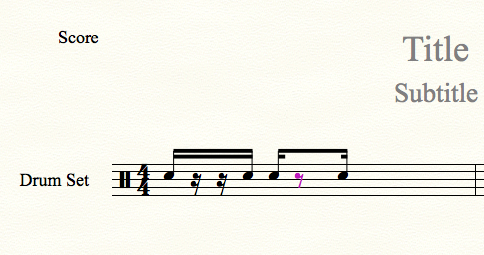
I need to know how can I extend the secondary beems over rests when the rests value is different from the note value.

As you can see in the picture (attachment), the beams over the 1st 16th note/pause groups are correctly exented, but when I use a different value (2nd 16th note groups) between the 1st and 4th 16th notes (8th note rest in this case) the beams are not extended. Of course from Document Option I checked the box "Extend secondary beams over rests"

Can someone help me?

Thanks


I use both Finale 2014 and Finale 25.

Operating Sys: MAC OS Sierra
 

2 comments

Date Votes
Avatar
0

First of all:

The layout on the second beat is considered {not standard practice}.

You do not combine two 16th rests into one 8th rest across the “half-beat”.


Second:

You CAN get the desired layout, with a workaround:


1) Instead of the 8th rest, enter a 16th rest as a {not displaying} tuplet:

1 Sixteenth in the space of 2 Sixteenths

This step will give the desired beaming.


2) Do not hide the 16th rest.

Instead, move the 16th rest down below the bottom of the page.

In that way it will not print, even if it is not hidden.


3) Now you just need to add the 8th rest:

Use the Speedy Entry Tool feature {Voice 1 / Voice 2} to enter an 8th rest in V2.

You must enter the 8th as a note, and then change the note to a rest.

Comment actions Permalink
Avatar
0

Hi Peter,

first of all thanks for your kind reply and for advice.
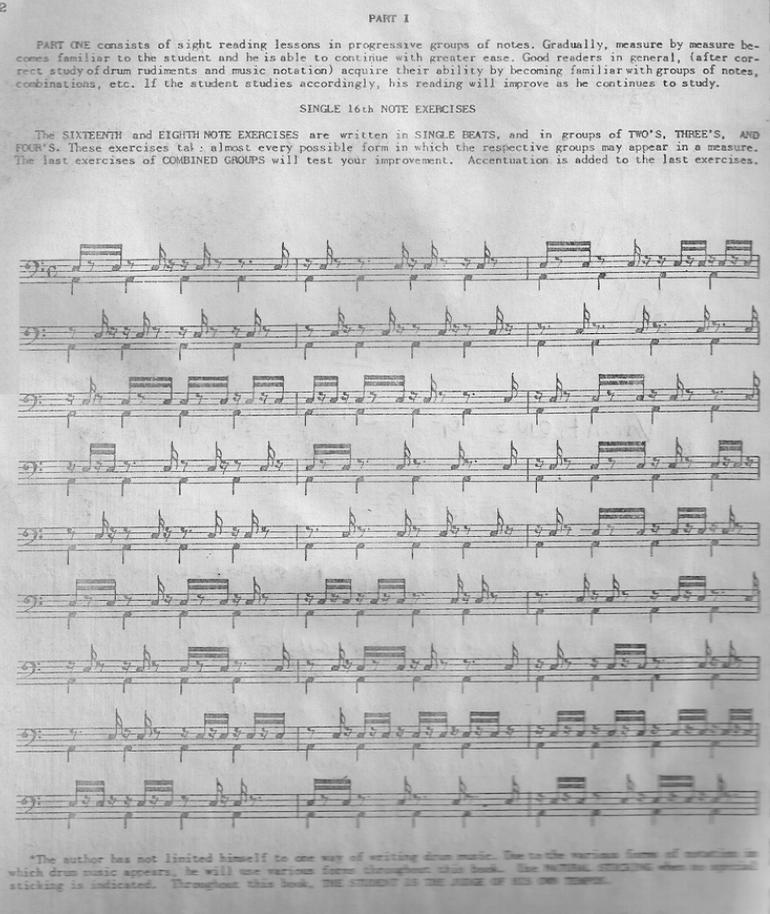
I would never write that way, but I have to copy the 1949 scores exactly as they were originally written.
You can see the score in the picture.
This is the only reason.

Thanks a lot
again and good day

Dario

Comment actions Permalink

Please sign in to leave a comment.