I have a file with many one-line tremolos like this:
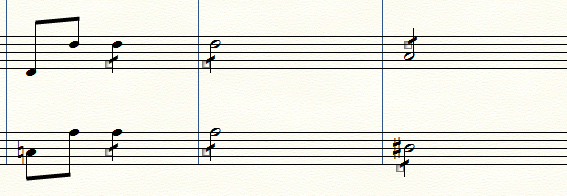
Is there a way to break all of them into specific notes? In the above the quarter note should be broken into 2 identical eights and the half into 4.
Finale 25
Win 10


Nir Lisker,
You wrote:
“Layout. Playback already plays it correctly (at least with Human Playback).”
Have you tried the plug-in “Rhythmic Subdivisions”?
Plug-ins menu > Note, Beam, and Rest Editing > Rhythmic Subdivisions…
It seems to me that the plug-in does, what you need.
If I misunderstand you, then I apologize.
Thanks, you understood me, but it's a suboptimal solution unfortunately.
Firstly, I need to select each region with these notes and only that region because the plugin does not care about the tremolo sign. If I want to do this for a whole score I need to move almost bar by bar selecting carefully the right places. Secondly, the tremolo sign stays on the first note of each division so I need to remove all of them manually.
I just want the sheet music to look like what is sounds when played - eights instead of a single-line tremolo note. If the reason matters, I'm preparing a strings piece for winds, where these tremolo signs are not commonly used, so I would like to literally spell it out for them.

Having spent many years in pit orchestras...
Spell out the first measure. Indicate that subsequent measures are played the same.
True, it's not that common for winds, show scores excepted, but there's nothing wrong with it. The important thing is that the players understand. Of course, pit players expect everything in a Broadway style font but that's a different issues.
Please sign in to leave a comment.
5 comments
Date Votes