New post
Avatar
0

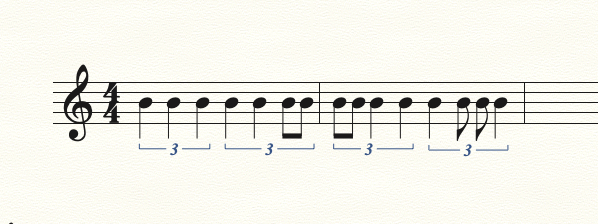
When I try to create a quarter note triplet made of quarter-quarter-two eighths, I get the first two quarters in, but Finale won't let me create the third quarter as two eighths. I can get one eighth in, but it thinks there's no room for the 2nd - it will show a sixteenth rest.

7 comments

Date Votes
Avatar
0
Comment actions Permalink
Avatar
0

I've tried both the Simple Entry, and Speedy Entry, Tools - same result. And I'm reasonably sure I was able to do this in previous versions.

I want to create a quarter note triplet, but the last quarter must be divided into 2 eighths of different pitch. If I used the Simply Entry Tool and select Quarter Note and Triplet Tool, I can create the first two quarters under the triplet bracket, but the remaining quarter rest "placeholder" only expects a 3rd quarter note. If I select an eighth note from the palate, It will allow me to add it but it doesn't believe there is room for the 2nd eighth note - it seems like it cannot subdivide the 3rd quarter into two equal notes. If I then move to the Selection Tool, Finale completes the tuplet with a sixteenth rest!

If I choose to create the equivalent triplet of 6 eighths in the space of 4, I can create the equivalent "sounding" triplet by tying the first two eighths into a quarter, and tying the 3rd and 4th eighths into a quarter, and follow with the 5th and 6th eighths on the separate pitches that I need. But it doesn't LOOK the way I want it to look, again as a quarter-quarter-two eighth mixed tuplet. 

Comment actions Permalink
Avatar
0

I found a solution! The problem was that I was trying to create the tuplet as the SECOND tuplet of the 4/4 measure. If I create it in a separate measure, or as the first thing of the measure, it will accept the 2nd eighth note. Similar to other issues with end-of-the-bar triplet creation.

Lesson learned...

Comment actions Permalink
Avatar
0

De-selecting “Check for Extra Notes” will allow you to end a measure with a tuplet.

Comment actions Permalink
Avatar
0

Where is the option check for extra notes? Can't find it.

Comment actions Permalink
Avatar
0

It depends on which note entry you're using.


For simple note entry, in the pulldown menu you'll see a choice of "Simple entry options". You'll see "check for extra notes" when you choose this option.


With Speedy entry, "check for extra notes" is right in the speedy's pulldown menu.

Comment actions Permalink
Avatar
0

I have to disagree. You don't have to deselect anything.

Enter the first quarter note.

Tap Opt/Alt-9, depending if you are on Windows or a Mac. Set the tuplet definition as 3 quarters in the space of two quarters. Save as default.

When you hit OK, you will go back to the score, where you enter the second quarter.

Tap the 4 key to switch eighth note, and enter the last two eighths.

Now, you can enter the sequence as:

5, note.

9

5, note.

4, note, note.


Saving the default as I described it will let you enter any sequence of eighths and quarters, on any beat.


Comment actions Permalink

Please sign in to leave a comment.