New post
Avatar
0

I am using Windows 7 and Finale 15.5. I would like to know if someone has used Finale to notate a rap and could give me some ideas about how to do it.

9 comments

Date Votes
Avatar
0

I would notate the rhythm as Rhythmic Notation (look in the Staff Tool), and attach the words with the Lyrics Tool.

Comment actions Permalink
Avatar
0

I've seen the PV Scores of In The Heights and Hamilton, and they look more or less like this.


Comment actions Permalink
Avatar
0

I agree with Adrian. X noteheads in the 3rd space.

Comment actions Permalink
Avatar
0

When I go to the Staff tool the only alternate notation I get is a slash note head on the third line.  What am I missing.

Comment actions Permalink
Avatar
0

I did not use the Staff Tool. Instead I entered regular notes and then used the Utilities > Change > Noteheads function on a selection of measures to change the noteheads to X-noteheads.

Comment actions Permalink
Avatar
0

One last Question. Finale adds the voice part at the bottom of the score. Can parts be rearranged on a score. I want the voice part on top of the score.

Comment actions Permalink
Avatar
0

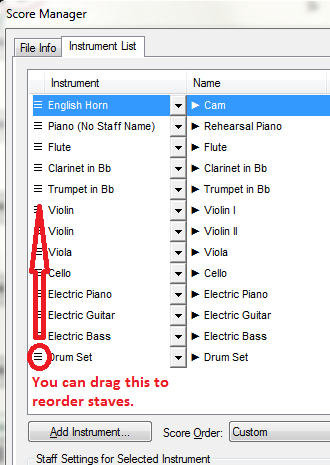
You can drag instruments in the Score Manager to reorder staves.


There is also a Reorder Staves routine in the Staff menu.

Comment actions Permalink
Avatar
0

it has been a while since I wrote for percussion with finale. I'm writing a drum set part but I can't get any playback on the drum part. What do I need to do. The piano part plays.

Comment actions Permalink
Avatar
0

Are you using VST (Aria/Garritan) playback or MIDI playback?


I used to use the Setup option when I started a file to assign the drum part, or use the Add Instrument routine from the Score Manager. The Drum Sets are really weak--can hardly be heard. I now use an outside VST program and a custom Percussion Map and Layout to get better sounds.


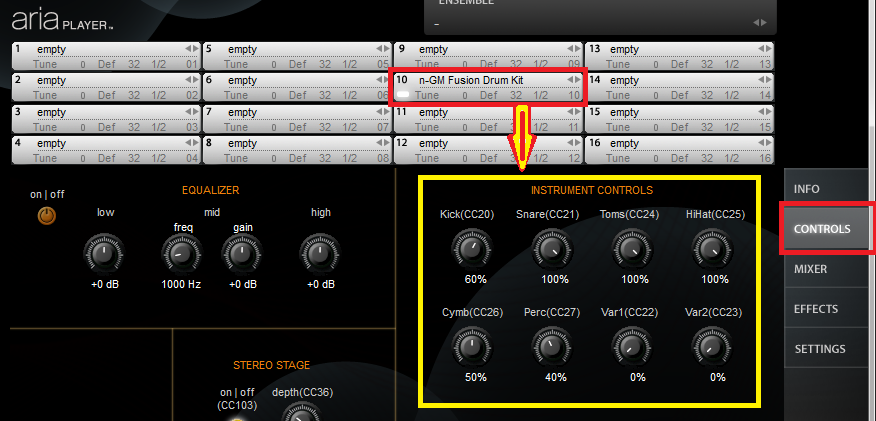
One more thing: in the Aria player, under Controls, you can adjust the various instruments of your set.
 

Comment actions Permalink

Please sign in to leave a comment.