New post
Avatar
0

For those members of the community who have experience in notation for classical guitar / guitar (not tablature), I would be grateful for your help as I have been trying to complete this piece for weeks now and find myself constantly encountering unusual quirks in Finale for which the solution is not immediately evident nor available anywhere in the manual. This has forced me into communicating directly with the support team on many a number of occasion to seek solutions which unfortunately they are reluctant to continue.

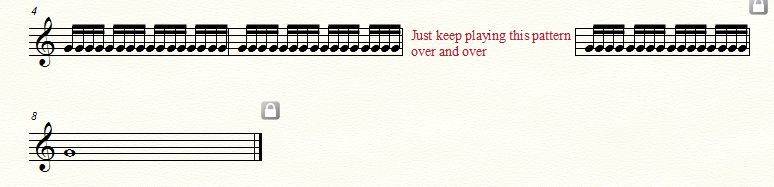
1) My first issue concerns notating classical guitar music. In this regard, I have been reproducing a piece by Leo Brouwer in Finale 25 both as a learning exercise as well as in preparation for a number of compositions I would like to publish personally. However, the Brouwer work has an unusual ending which includes inserting text in the stave prior to the final bar.  In other words, the next bar or two on the

In other words, the next bar or two on the stave is hidden and a text box is attached to those bars. I have been interacting with Kevin S from the Finale support team who provided some information on how to achieve this however, my version doesn't react the way he has indicated it should, and so I am unable to finalize the piece and I am now unable to raise him for further support. Has anyone encountered this requirement and how have you managed the process in a step-by-step manner?

2) I simply cannot resize the finale (fine) bar at the conclusion of the piece. Finale seems to want to occupy the entire line in accordance with the overall document settings. Again, I received some guidance on how to resize the bar however, my copy just doesn't seem to behave the way it was described that it should. Anyone who has some idea of how to overcome these issues, please feel free to help a hapless sailor out here!

3) Lastly, this is a general enquiry for which suggestion are openly sought.

I have discovered that preparing straight forward music in Finale is relatively easy to accomplish. However, there does not appear to be provision for preparing more specialized notation for instruments such as classical guitar. This is really hampering my progress and with it, a number of projects. So, does anyone in the community know of any experts in this product who may be willing to offer their time on a consulting / training basis to assist me to become really familiar with what I need in order for me to achieve independence with this product?

6 comments

Date Votes
Avatar
0

1) “… the next bar or two on the stave is hidden, and a text box is attached to those bars …”

It is unclear (at least to me) what you are trying to do, and why.

What is the problem you are trying to solve?

There might be a better solution that you have not even thought about.

The better we understand, the better we can help you.


2) “… I simply cannot resize the final (fine) bar at the conclusion of the piece. Finale seems to want to occupy the entire line in accordance with the overall document settings …”

If I understand you correctly, the last system in the document is a 1-measure system, right?

To resize this last measure you must edit the margins in the last system.

There are two ways to do so. Both ways are done in the Page Layout Tool:

a. (the high-precision, professional engraver quality solution)

Click the last system to select it, and go to

Page Layout menu > Systems > Edit Margins…

b. (the qiuck-and-dirty, not so precise solution)

Drag the system handle(s)


3) I suggest that you ask questions in several Finale forums.

Generally, forum members are most kind and willing to help you.

You have already found this Finale forum.

Here is one of the other forums:

http://www.finaleforum.com/index.php 

Comment actions Permalink
Avatar
0

Like Peter, I am a little confused what you are asking for. Is this something close?


Comment actions Permalink
Avatar
0

Thank you, Peter and Adrian for your comments.

Peter, Adrina has hit the nail on the head - this is exactly what I am trying to achieve, however when I follow the Finale support team recommendations, I simply cannot link the text box to the hidden bars. I can create a text box but find no way to attach it to the hidden bars as in Adrian's example. Your suggestion for resizing the final bar as shown in Adrian's example is good - particularly the a) suggestion - Finale support provide the b) quick and dirty method but it simply doesn't work in my copy

Adrian,  thank you for providing the example - as mentioned above - that is exactly what I am trying to achieve. Please could you outline for me how I achieve this in step by step Finale for dummies style.

I also tried to attach my files to my original post so folks like yourselves would understand what I was trying to achieve but it would not accept PDF's and even Finale's own file!! How do I do that in the future i.e. how did you attach the example you included in your reply Adrain?

Lastly, thank you both for your response and help.

Regards Ron

Comment actions Permalink
Avatar
0

Attach the text to the previous measure and drag it into position over the hidden measure.


In Windows 7 I can use the ALT+PrtScn key combination to save a screen shot of the top window to my clipboard. I can then paste the image into the Paint program included with Windows to crop and annotate it. There are (I know) similar capabilities on the Mac, but I do not have them memorized, to save a screenshot on the desktop and to open it in a Mac utilities program for editing.


(Incidentally, I had to go back into your past posts to find out which operating system you use. Please use the Profile link available under your name in the gray strip at the top of the screen to enter your Operating System and version of Finale so people can check it without your entering it each time--although doing so may still save time for those who wish to help you. I know the profile page starts with a statement that fields are pre-defined, but there is a text box at the bottom where users can enter important info. Then, by clicking on your name--or mine--at the start of each post anyone can see what version and OS you use.)

Comment actions Permalink
Avatar
0

Ron Dolan,


You wrote:

“… I simply cannot link the text box to the hidden bars …”.

Have you tried adding the text block from Scroll View? That method works for me.


In order to give you the best possible help we need more info from you:

What are you trying to achieve?

How are you trying to do it?

What happens when you do that?

What doesn't happen that you expect to happen?

Comment actions Permalink
Avatar
0

Thank you Peter and Adrian for your helpful comments. Using a mixture of your various suggestions, I have managed to complete the piece. Firstly, I used Peter's suggestion of scroll view followed by Adrian's suggestion regarding creating the text box in the previous bar and then moving it to the hidden bar section. This worked better than attaching the text bar to the hidden bar. I then used Peter's suggestion of using the document layout feature and adjusting the width of each bar. So thanks to both of you for your support and assistance. 

Comment actions Permalink

Please sign in to leave a comment.