New post
Avatar
0
  1. Open a document.
  2. Select Document menu > Data Check > Font Utilities…
  3. Check the box to the left of Check Document Fonts Against System Fonts
  4. Click Apply
  5. Fonts with names like this appear: "Missing Font (86) (missing)"

Create text on the page and select it, then go to Text menu > Character Settings… and search for "Missing Font (86) (missing)." It's not in the list, nor is it present in Apple's Font Book.app.

This happens in the Finale default document, not just existing documents I've created in the past.

Does anyone have an idea about how to get rid of this mystery font?

Thanks for your help!

Gregg

------------------

Specs:

macOS Sierra
Version 10.12.5

Finale
Version 25.3.0.276

17 comments

Date Votes
Avatar
0

You should be able open the document properties, see if you can select installed fonts to see if notes, text and lyrics display. If that fixes you up, declare victory.


As to why this is happening, not enough information.


What font are you looking for?

How old is that document i. e. what version of Finale created it?

Did you create that doc or did you import it?


Comment actions Permalink
Avatar
0

Thanks for such a speedy response, Mike!

To answer your questions:

I'm not looking for a font.

The document is newly created by Finale 25.3.0.276.

I created the document by doing this:

  1. Select File menu > New > Default Document

Before doing a single thing to this brand-new document, follow steps 2 through 4 above.

The oddly named font appears.

I figure that if this mystery font appears in a freshly created default document, then there's something basic that's wrong with Finale rather than an individual file.

Let me know if you need further information.

Thanks again for your input!

Comment actions Permalink
Avatar
0

I'd suggest you ignore the results of the Data Check. Data Check has been buggy as all hell for many Finale versions. Furthermore, Finale's handling of fonts is extremely suspect, starting with Finale 2012 and getting worse with every succeeding version. You are probably more than experienced enough to be able to scan your files on screen or in a printout to determine if your fonts are displaying properly. Default Finale files consist mainly of only 2 fonts - Maestro for music symbols and Times New Roman for text.


Don't take my word for it - contact Make Music Tech Support and you're likely to not receive satisfaction.

Comment actions Permalink
Avatar
0

Thank you, Bruce.

Although I currently earn my keep as a music engraver, in the past I've managed both prepress and graphic arts departments for various music publishers for many years.

The problem I consistently run into is fonts that look fine onscreen in Finale; look fine in Acrobat Reader or Pro after being saved as a PostScript file, then distilled into a PDF; and look fine when printed to a laser printer, but somehow magically* turn into Courier when sent direct to plate.

This has been happening for years, all the way back to the days of film.

What prompted this thread was a discussion this morning with our in-house print-shop manager (who also personally does most of the prepress work). He blew up (not for the first time) over font substitutions like I've described above.

So I thought I'd take a different approach and see if I could find this bug at the most basic level: by creating a brand-new default document, etc., etc. (I won't repeat any more of the above.)

Yes, interactions with MM tech support are usually frustrating at best, as in, "No satisfaction for you!" (spoken a la Seinfeld's Soup Nazi)

Thanks for chiming in, Bruce!

Gregg

*Evil magic, of course!

Comment actions Permalink
Avatar
0

Different questions:

Are you new to Finale or is this an upgrade?

What is your earliest version?

If an upgrade, what happens when you open a doc created in an earlier version?


Nothing in your post indicates a bug. 

Comment actions Permalink
Avatar
0

The first version of Finale I purchased was Finale 1997. (I believe that's what it was called, though it's a dim memory now. I think I still have the installation disc and printed manual on a shelf somewhere.)

I've seen this problem for years in the following versions: Finale 2008, 2009, 2010, 2011, 2012, 2014, and 2014.5, perhaps others, but I can't remember.

I've freshly installed Finale 2014 and 2014.5 on a brand-new iMac and seen the problem before installing any other program.

I'm currently running Finale 25.3.0.276.

I've seen this in files created in 2014 and 2014.5 when opened in Finale 25.

Gregg

Comment actions Permalink
Avatar
0

Are you using only the supplied MM fonts or 3rd party also? If so, anything from Adobe?

Comment actions Permalink
Avatar
0

I have many third-party fonts installed, including some from Adobe.

But none of them are in a Finale default document, which uses only fonts supplied by MakeMusic.

Gregg

Comment actions Permalink
Avatar
0

Ok. Go to Library/Fonts. Is Maestro.suit installed? Is Maestro.ttf installed? If Maestro.ttf is found, what is the version number in Get Info, 1.1 or 1.2?


Open Font Book.app. Do you see one copy of Maestro installed or two (if two, one should be greyed out)? If more that two, additional copies should also be greyed out.

Comment actions Permalink
Avatar
0

I have only one copy of Maestro installed.

There are duplicate non-MM fonts, but I've used Font Book.app's Resolve Duplicates routine to disable all but a single copy of each of them.

Gregg

Comment actions Permalink
Avatar
0

>I have only one copy of Maestro installed.<


I asked specific questions about Maestro. I can't help if I don't know the answers.

Comment actions Permalink
Avatar
0

Maestro.suit is installed.

Maestro.ttf is not installed.

Comment actions Permalink
Avatar
0

You do not have the current versions of the Finale fonts installed. If you had Maestro.ttf v. 1.2, I'd be clueless right now—but you have a version that goes back to 1999. 


Let's see what happens when you have the current fonts installed. Here's the easiest way I know.

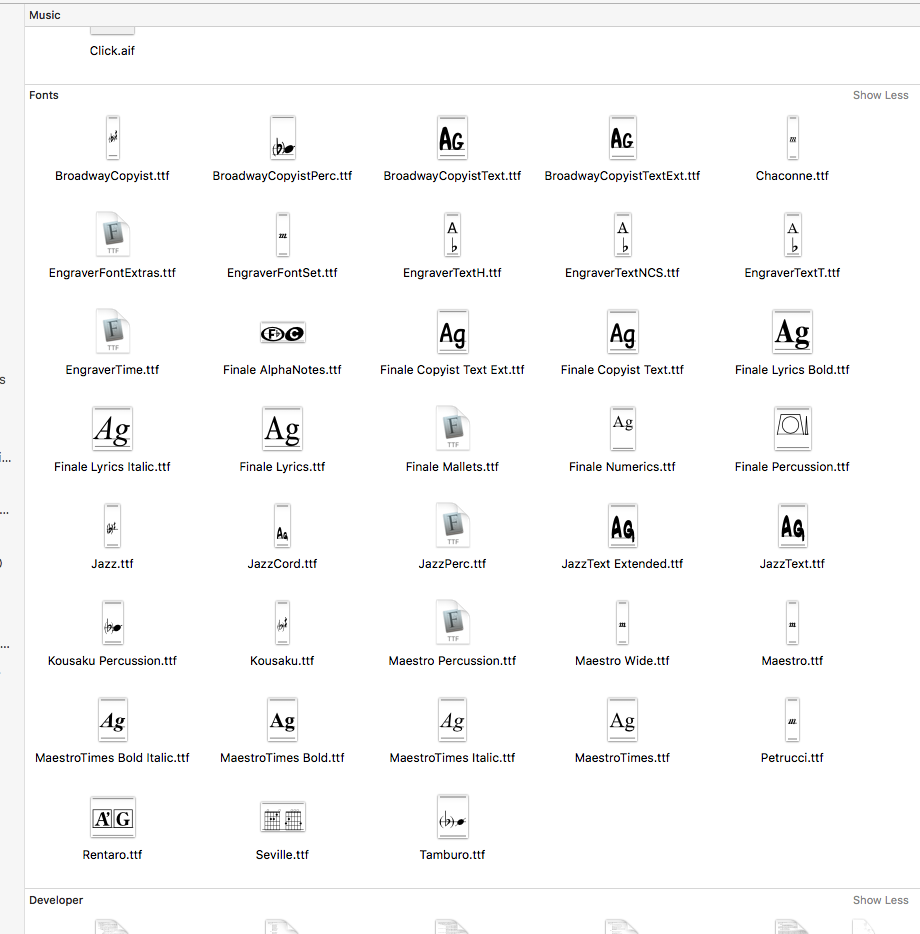
First, I'll presume that you know how to get to Finale/Contents/Resources, right? Open that folder, Arrange by Type. This will display all the current Finale fonts for the Mac together. You'll get a window that looks like this with all 38 fonts showing — we'll get back to that.


Now, using that graphic or the open folder as a guide, find every font in Library/Fonts with the same family names. They will not match the above list. If you want, create a folder on your desktop and drag the installed fonts to it—this will create copies but really isn't important. Drag the installed fonts to Trash. When done empty.


Now, go to Finale/Contents/Resources highlight them all and double-click. All 38 will open and you will see Install Font. Install all of them. Most will give you serious problem errors because they do not show upper, lower case and numerics (notation fonts don't). Check the boxes, type your admin and keep going till all are installed. This installs copies; the originals are untouched.


There is no reason to reinstall the old versions. As you know, the Mac OS since 10.7 won't allow it anyway. Older versions of Finale work great with the current fonts that should have installed with 25.2 (but only do for new users).


See if you still have a problem.


Comment actions Permalink
Avatar
0

Thank you, Mike. I just left for the day, so I'll try this first thing in the morning and let you know the results.

Comment actions Permalink
Avatar
0

Morning, all.

Mike, I've followed your procedure and no longer have my problem.

Thanks very much for your help and patience.

Gregg

P.S. I hate fonts. Just hate 'em.

Comment actions Permalink
Avatar
0

Not a problem. Happy to have helped.


>Furthermore, Finale's handling of fonts is extremely suspect, starting with Finale 2012 and getting worse with every succeeding version. Y..<


Let's put this one to rest. 25 is the first version of Finale in a very long time that follows Apple's directives on how fonts are to be handled. Older versions going back to ? did not. With every OS release since 10.7, Apple tightened what the OS would allow but the requirements didn't change.


As I have posted before, Mac users new to Finale running the current version on a current OS do not have these font problems. The longer you've been using Finale, the more likely you are to be susceptible to these and other font issues. The solution I gave was a complete purge of the old MM fonts and a reinstall of the current versions, released with 25.2. Older versions of Finale on current Macs work fine with these newer fonts, BTW. I have F-2011, NotePad 2012, F-2014.5, PM-2014.5 and 25 all installed and using that one font set. If someone was having these issues in older versions, installing the current 25 demo, extracting and installing those fonts should apply the same fix.


I figured this out a few years ago with Encore which was giving me major grief due to old versions of those fonts. When Finale acted up, I thought "Hmmmm..." and the same thing worked.

Comment actions Permalink
Avatar
0

Thanks for the info, Mike.

What's odd to me is that, as I mentioned above, I've taken a brand-new iMac out of the box as recently as two years ago and installed 2014.5 on it before installing a single other piece of software.

And last fall (2016), I had reason to completely reformat that iMac. I installed the then-current version of Sierra and Finale 25, nothing else. That's just a few months ago, yet you spent a good part of yesterday helping me out.

*shrugs*

Gremlins and demons, I guess.

Thanks again!

Gregg

Comment actions Permalink

Please sign in to leave a comment.