New post
Avatar
0

I'm scoring for a full symphonic band and have several instruments with 2 parts on one staff (1st and 2nd oboe together on one staff, 1st and 2nd trombone together, etc.).  I'd like to print each part separately.  There are times when the 1st part is playing but the 2nd isn't.  How do you make it so on the part you have the notes appearing for the 1st part, but multimeasure rests for the 2nd?  When there's only one layer of music, it'll show up in both parts.  If I fill the 2nd layer with whole rests, then it won't allow a multimeasure rest to appear on the 2nd part.  

7 comments

Date Votes
Avatar
0

I can't imagine having both notes and MMRs in the same staff.


If I misunderstand, could you explain further, or post a picture of what you're thinking of.


If you're talking about the imdividual parts, you may have to extract them, and then create the MMRs.

Comment actions Permalink
Avatar
0

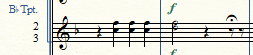
Here's a few examples of the 2nd and 3rd trumpet parts, that share a staff on the score.  I want them to be separate in the parts.  Sometimes 2nd plays something different than first, and they're in different layers, like below:

Sometimes when they play different pitches but the same rhythms, they're in the same layer, like below:

Sometimes they play in unison, like the 2nd measure below.

Sometimes 2nd trumpet plays while the 3rd trumpet rests.  This is where I need to have multimeasure rests in the 3rd trumpet part.

I tried extracting parts and that seems like it will work.  But I'd like to avoid having more than one file.  It's so much easier having everything in one file!

Comment actions Permalink
Avatar
0

JW Staff Polyphony would handle that easily. It will split parts from layers, or on another setting, it will split the chords, copying the unison notes to both parts.

Comment actions Permalink
Avatar
0

OK, JW Staff Polyphony?  What's that, how do I get to it?

Comment actions Permalink
Avatar
0

Go to http://www.finaletips.nu/index.php/download 

In the Plugins column, click on either Mac or Windows (NOT the 64-bit version) and scroll through until you spot Staff Polyphony. Download it, and install it in your plug-ins folder.


Jari does not charge for these, but he does accept donations. If you find it useful, please do!

Comment actions Permalink
Avatar
0

Here is the help manual description of "Voiced Parts" which is what you want to do if you want separate parts from a multi part score stave:

https://usermanuals.finalemusic.com/FinaleMac/Content/Finale/Part_voicing.htm?Highlight=Voiced%20Parts 

Here is the technique to get multi rests in one part while the other part plays:

http://www.finaleforum.com/viewtopic.php?f=5&t=15231&p=52048&hilit=Voiced+Parts+Multimeasure+Rests#p52048 


You can't use the Staff Polyphony with Linked Parts because it will alter the contents of the score staves from which you're trying to split into separate parts.

Comment actions Permalink
Avatar
0

This is one of the kludges if you want to keep linked parts.

Put whole rests in Tpt 3 in Layer 2, as you have done.

In the Tpt 3 linked part, you will see single measures of real whole rests, which will not combine into multimeasure rests. So you have to create a Staff Style, where you define it as  "Blank Notation (with rests)"  applied to Layer 2. (Honestly, Finale should come with this already created.) Then you apply this staff style ONLY to the part in the sections where you want to hide the real rests. Once it is applied everywhere you need it (and yes, it takes more key clicks than I think it should) then you select All and Create Multimeasure Rests.

Done.

Comment actions Permalink

Please sign in to leave a comment.