I want to move from 4/4 into cut-time, but the cut-time is not showing up on the score.
What am I doing wrong?
Thank you


… I want to move from 4/4 into cut-time …
What do you mean?
1) You have entered the entire piece in 4/4, and now find out that 2/2 better fits the character of the music,
or
2) The first region of the document is in 4/4, and the next region is in 2/2.
Which is it? 1) or 2)?
Anyway, there are several possible culprits.
One possible culprit:
Measure Tool.
Double-click the measure.
In the Measure Attributes, in the pop up menu Time Signature, is the measure set to, Always Hide its time signature?

Tracy,
You do not say what version of Finale or Operating system you are using. That makes a difference whether you can change time signatures at all.
Please use the pull-down behind your name at the very top of the screen to add this info to your Profile/Signature. Although many fields in the profile are pre-assigned, you can still enter program and OS information in the information box so it will appear on each of your posts.
… It says, Show when needed …
In that case I suspect that the culprit can be found in the Time Signature Tool.
The dialog box Time Signature can be expanded to show the option “Use a Different Tims Signature for Display”.
I suspect that the “real time signature” is set to 2/2, and that the “display time signature” is set to 4/4.
>> Tried that, but it won't let me change/add anything in my profile.
Tracy (and others who have not yet updated their profiles with Finale version and computer OS),
It is possible (via the pull-down behind your name at the very top of the screen);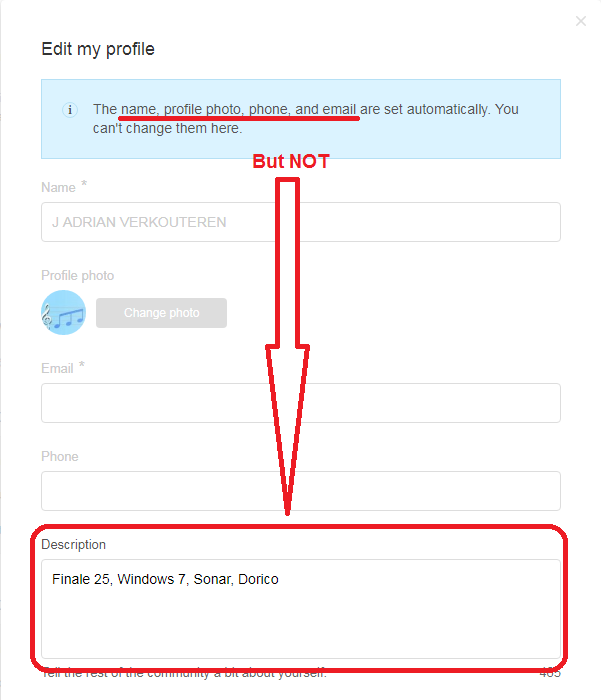
EDIT: Thank you, Tracy. You did it!
Please sign in to leave a comment.
8 comments
Date Votes