Hello,
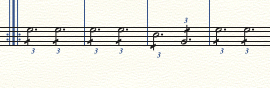
I'm looking for a way to change a repeated chord/note triplet into a one-note dashed triplet, like so:
Also, is it possible to make this play back correctly?
I use Finale 2014.
Kind regards


Enter the dotted quarter as a {3 Eighths in the space of 2 Eighths} triplet.
Add the {across stem} dash with the Articulation Tool.
For the playback, consider using notes in a hidden layer (e. g. Layer 4).
By The Way:
Are you familiar with Finale’s plug-ins, e. g. the plug-in Easy Tremolos?

… Finale removes both the triplet and the dot as soon as I change something in the measure, like adding a dash, copying, clicking the next measure etc. …
What happens, is that Finale is re-transcribing the music.
This re-transcribe only happens under special circumstances:
1) The measure is not filled.
Fix:
Make sure that you have filled all the measure’s beats, before you change something.
2) You are copying a partial measure, e. g. only a single beat.
Fix:
Do not copy a triplet abbreviation from a partial measure selection, but rather enter the triplet abbreviation in the destination measure, and fill up the destination measure.
3) You are copying a filled measure, but not via Stack Selection.
This can happen in a multi-staff document where you want to copy only a single staff.
Fix:
To make a Stack Selection of a single staff in a multi-staff document, use a Staff Set of only that staff.
Copy that Stack Selection, and you can paste the copied correctly.

I am having a similar problem to Douwe. I am wanting to write two slashed dotted minims (half notes) in a cut time bar. I can enter one of them as Peter describes (Enter the dotted half as a {3 quarters in the space of 2 quarters} triplet.), but Finale (26.3 Mac) is not allowing me to enter the second, giving me the 'bonk' sound that I get to indicate that there are not enough beats left in the bar to enter the note I am trying to enter. I fully acknowledge that I am doing something wrong, but can't find the correct way to successfully enter two triplet dotted minims (half notes) in a 2/2 bar. Could you explain in more detail the way that I need to enter the notes?
TIA :)
Richard
Richard Guthrie,
1) Welcome to the forum!
2) While being blindfolded I am guessing:
- You are entering notes with the Simple Entry Tool (not with the Speedy Entry Tool) - right?
- You are trying to end a measure with a tuplet - right?
There are several ways to enter tuplets.
My guess is that your way of entering a tuplet (at the end of a measure) will not work unless you de-select the option Check for Extra Notes.
Explanation: As you are entering the tuplet, Finale considers the measure to be temporarily “overfilled”.
By The Way:
Mike Rosen has a Simple Entry Tool tuplet tutorial on his web site.
I suggest that you take a look at it:
Peter
Thanks very much for your quick response. I was using Simple Entry for the tuplets and clicking the page to input, although I am inputting most of the notes with a MIDI keyboard. I have had a look at Mike's tutorial which has alerted me to the keyboard shortcut for accessing the Tuplets dialogue box. However, I got stuck at the end of the bar once again.
I eventually found the 'Check for Extra Notes' option to de-select in Speedy entry. I was then able to create two dotted half notes in a cut time bar using Speedy Entry, which I then turned into triplets using the Tuplets tool, which added the '3', and added the slashes with the Articulation tool.
If there is a neater way of achieving this, I would be interested to hear about it. I appreciate that for repeating bars I can copy and paste once I have created one bar, and then repitch the notes if necessary.
Thanks again for taking the time to reply.
Now I am confused.
In your first post you wrote “two slashed dotted minims” and “two triplet dotted minims (half notes)”.
I thought that you were talking about two different things.
A {slashed dotted half} means a sextuplet with 6 eighths in the space of 4 eighths (the slash means eighths).
On The Other Hand, a {triplet dotted half} means a triplet with 3 quarters in the space of 2 quarters.
However, your attached graphic shows that you mean the same thing.
Your layout shows a quarter triplet - 3 quarters in the space of 2 quarters - where each quarter is subdivided into two eighths.
While your layout is not incorrect, technically, it is considered a bit “non standard”, and most performers will find it confusing.
To save rehearsal time I recommend that you instead notate as a sextuplet - 6 eighths in the space of 4 eighths.
After all, the abbreviation symbol means 6 notes, not 3 notes.
… I was using Simple Entry for the tuplets and clicking the page to input …
There are several ways to input tuplets. As you have found out, your way will not work with {Check for Extra Notes} selected.
… I eventually found the 'Check for Extra Notes' option to de-select in Speedy entry …
This is confusing. Now you are talking about the Speedy Entry Tool.
Are you saying that you could not find the {Check for Extra Notes} option in the Simple Entry Tool?
(Simple menu > Simple Entry Options > Check for Extra Notes)
… If there is a neater way of achieving this, I would be interested to hear about it …
Mike Rosen’s tutorial explains how you can do it in the Simple Entry Tool - and it is not necessary to de-select {Check for Extra Notes}.
Basically the Simple Entry Tool has a nice Tuplet (sub-)Tool which you can use quickly via keyboard shortcut (= Option-9).
Since it is a sub-tool, you are not leaving the Simple Entry Tool.
Also, the Speedy Entry Tool has a nice Tuplet (sub-)Tool, with keyboard shortcuts. No need to de-select {Check for Extra Notes}.
Here is the entry string in Speedy Entry (for Mac Finale):
Option-6 (activating the Tuplet sub-Tool, preparing Finale for sextuplet entry …)
4 (… namely a sextuplet in eighths …)
LeftArrow (… however, the first tuplet note should not be an eighth …)
6 (… but rather a half …)
. (… which is dotted)
Peter
Once again thanks for your comprehensive answer. I can assure you that you were not as confused as I was! Thank you for telling me where I could find the 'Check for Extra Notes' option in the Simple menu, which was eluding me. The only place that I could find it was in the Speedy Menu, not realising that I had to open the Simple Entry Options to find it, rather than it being in the initial submenu.
My intention was to write a bar of sextuplet quavers/eighth notes, and then change to the abbreviation, to save space, and to replicate what was handwritten in the 18th C parts from which I am reconstructing. As an orchestral musician, I would have no problem in converting it back in my head as I play.
I am sure that the detail into which you have gone will be of help to others as they search for help with tuplets.
Thanks again. Richard
Please sign in to leave a comment.
9 comments
Date Votes