I want the second measure in the part. to be measure no. "1". The first measure in the part is a pickup measure. I have tried the Document/Pickup Measure command, but it doesn't seem to work.
I'm using Mac OSX and Finale 2012


Two solutions:
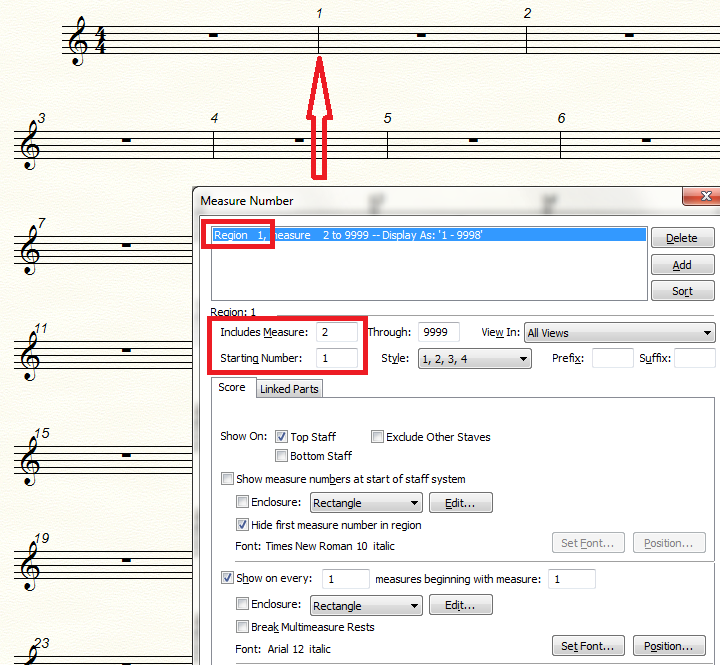
1) Document menu > Edit Measure Number Regions…
Select the measure number region you need to edit (in case the document contains more than one measure number region).
Set the region to include ‘Measure 2 Through …’
2) Measure Tool.
Double-click the first measure (= the pickup).
The dialog box Measure Attributes appears.
De-select the option ‘Include in Measure Numbering’.
Warning:
If one or more measures have the option ‘Include in Measure Numbering’ de-selected, you may sometimes experience that an action affects the wrong measure(s).
Fortunately there is a simple fix for this bug:
Go to
Preferences > View > Measure Numbers
and choose ‘Display Actual Measure Numbers’ (instead of Display Defined Measure Numbers).
This setting does not affect the layout; it only affects the measure numbers Finale displays in its dialog boxes.
Dear Bruce and Peter:
I have tried all of your suggestions and they don't seem to work. I do not have a Finale "score"., just a hard copy. I am preparing an individual part (for guitar) to replace a missing part from a big band chart. All of the other parts in the chart begin the measure numbering on the measure after the pickup measure, so I need to number the measures in this part the same way.
Is there some way I can forward the part to you?
Malcolm Harris

Is there some way I can forward the part to you?
In this forum you can not upload Finale documents.
You have to upload the document elsewhere, and here in the forum add a link to the document.
You can e. g. upload your Finale sample document in this, other Finale forum:
Please sign in to leave a comment.
5 comments
Date Votes